
Hello. This isKototsuki Design.
When creating a website for a hotel or ryokan, you might think, “All I need to do is post some nice photos and showcase the guest rooms and cuisine.” Of course, those things are important. But visitors to an accommodation website want to know more than just the size and amenities of the rooms. What kind of food is served?What kind of baths can they enjoy? What kind of experience can they expect if they stay here? And when they decide they want to stay, can they make a reservation smoothly? I believe it’s crucial for an accommodation website to present all this information in a cohesive, integrated way.
Today, I’ll summarize the key points to consider before creating a website—from estimated costs for hotel and ryokan website development to photos, guest rooms, cuisine, baths, sightseeing information, and the reservation system.
What Is the Average Cost for Creating a Hotel or Ryokan Website?
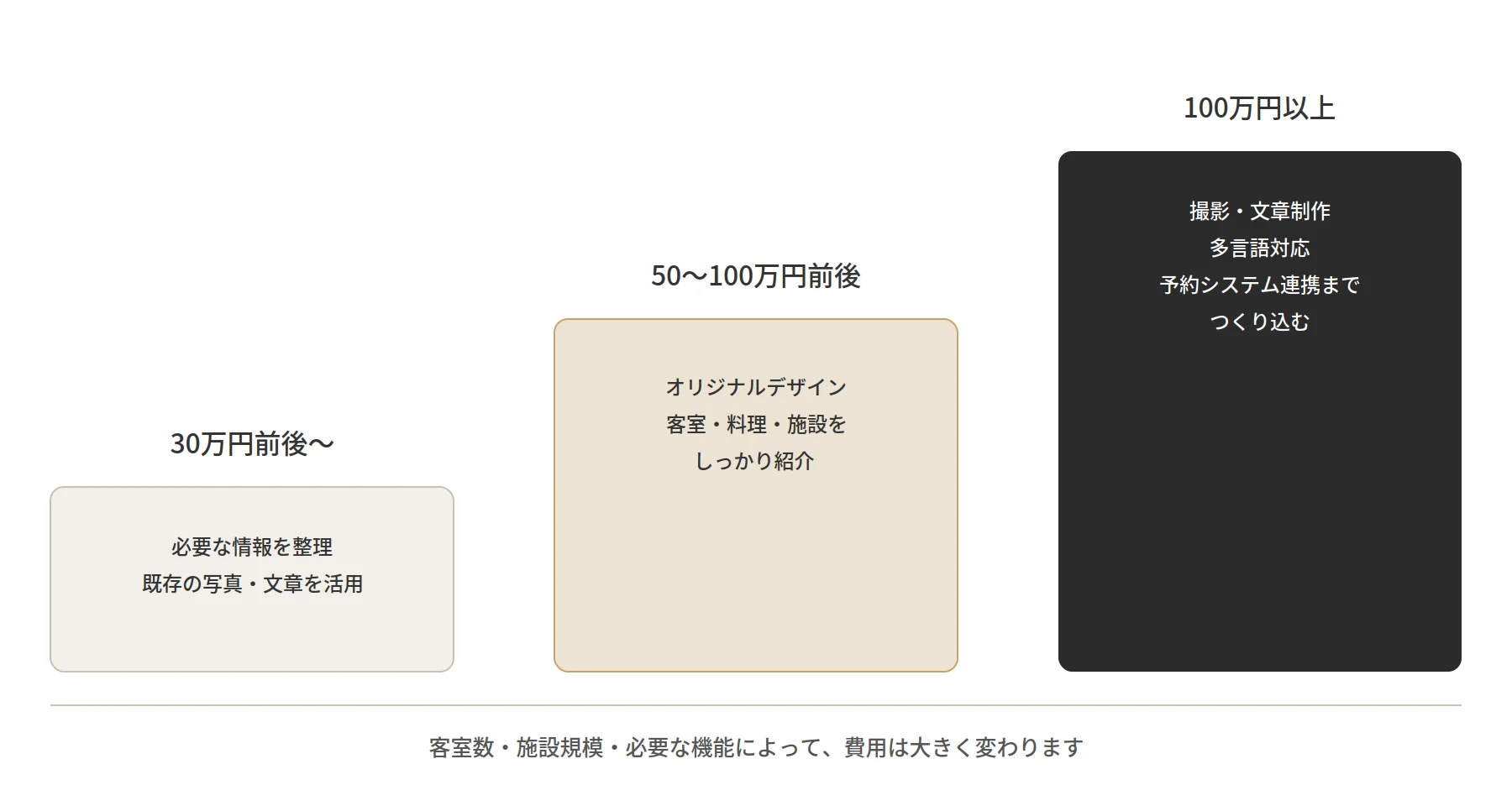
The cost of creating a website for a hotel or ryokan depends not only on the number of pages and the design but also on the scope of the project—including photography, copywriting, the reservation system, and multilingual support.If you already have the photos and text ready and simply need to organize the necessary information in a straightforward way, the project may be relatively straightforward. On the other hand, if you plan to create individual pages for each guest room, provide detailed introductions to the cuisine and on-site facilities, or integrate a reservation system, there will be more factors to consider.
Estimated Costs | Type of Project |
Around 400,000 yen and up | A case where the necessary information is organized to create a relatively simple website. If existing photos and text can be utilized, the scope of work can sometimes be kept to a minimum. |
Approximately 500,000 to 1,000,000 yen | A website featuring an original design that thoroughly showcases guest rooms, cuisine, and on-site facilities. This involves careful planning of the site’s structure and user flow. |
1 million yen or more | This category involves a comprehensive website build, including photography, copywriting, multilingual support, and integration with a reservation system. |
Of course, these are merely guidelines. Even for “hotel websites,” the scope of work varies significantly depending on the number of guest rooms, the scale of the facilities, and the required features. Rather than focusing solely on the price, it’s important to clarify exactly what you’ll receive for that cost.
What Matters Most on a Hotel or Ryokan Website Is “The Sense of What It’s Like to Stay There”
When searching for a hotel or ryokan, not many people decide to book based solely on photos of the guest rooms. What are the rooms like? What kind of meals are served? What’s the atmosphere of the bath area? What’s around the property? And what kind of time can you spend there?I believe people are imagining what it would be like to actually stay there as they browse the website. That’s why it’s important for hotel and ryokan websites to convey not just “information about the facility,” but also “the experience of staying there.”
Understanding the Differences Between Room Types
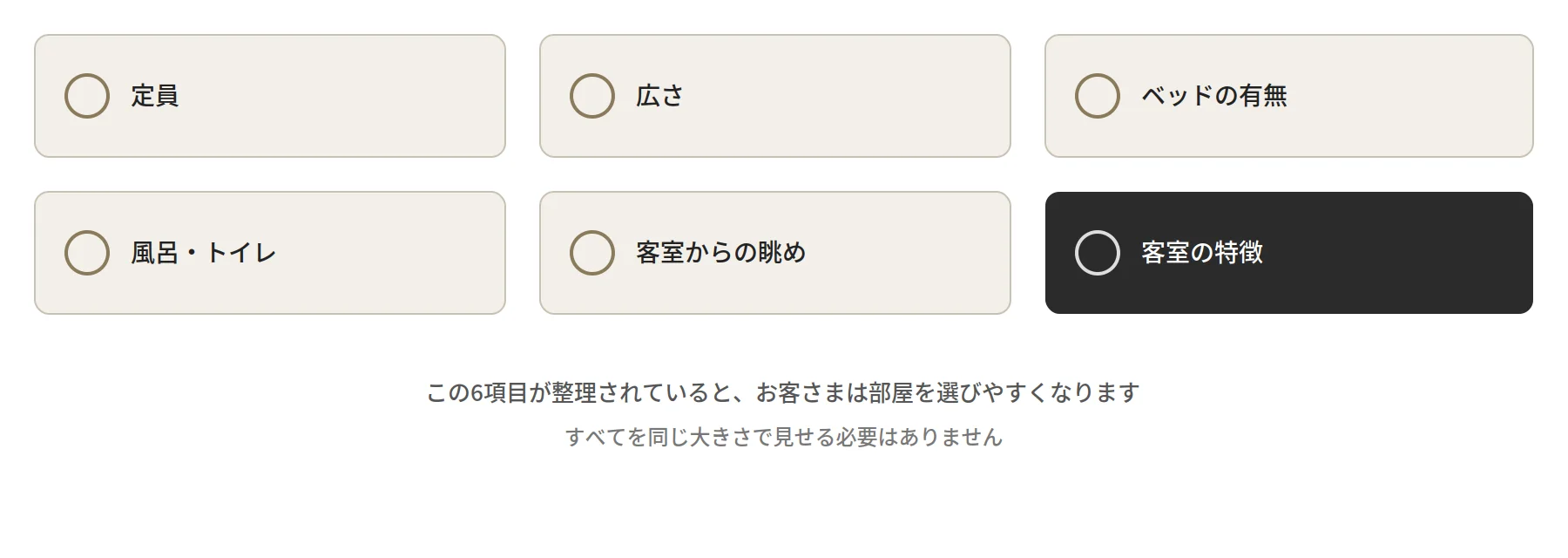
Hotels and ryokans often offer several room types, such as Japanese-style rooms, Western-style rooms, rooms with open-air baths, and special suites. If visitors don’t understand the differences between these rooms, they’ll end up wondering, “Which room should I choose?” even if they’re initially interested.In addition to photos, organizing information that guests are likely to need when considering a reservation—such as occupancy limits, size, whether beds are provided, bath and toilet facilities, views from the room, and room features—makes it easier for them to choose a room.
However, you don’t need to display all the information equally prominently. It’s also important to consider what information is sufficient for the people choosing that particular lodging.
Photos Convey the Atmosphere of the Accommodation
Photos play a major role on hotel and ryokan websites. Having photos that allow guests to imagine their stay—not just of the guest rooms, but also of the exterior, interior, lobby, meals, baths, surrounding scenery, staff, and seasonal views—makes it easier for them to visualize their experience there. That said, more photos aren’t necessarily better.Rather than simply lining up a large number of photos, asking yourself, “Which photos best convey the unique character of this property?” can often result in a more user-friendly website.
The Process of Creating a Hotel or Ryokan Website
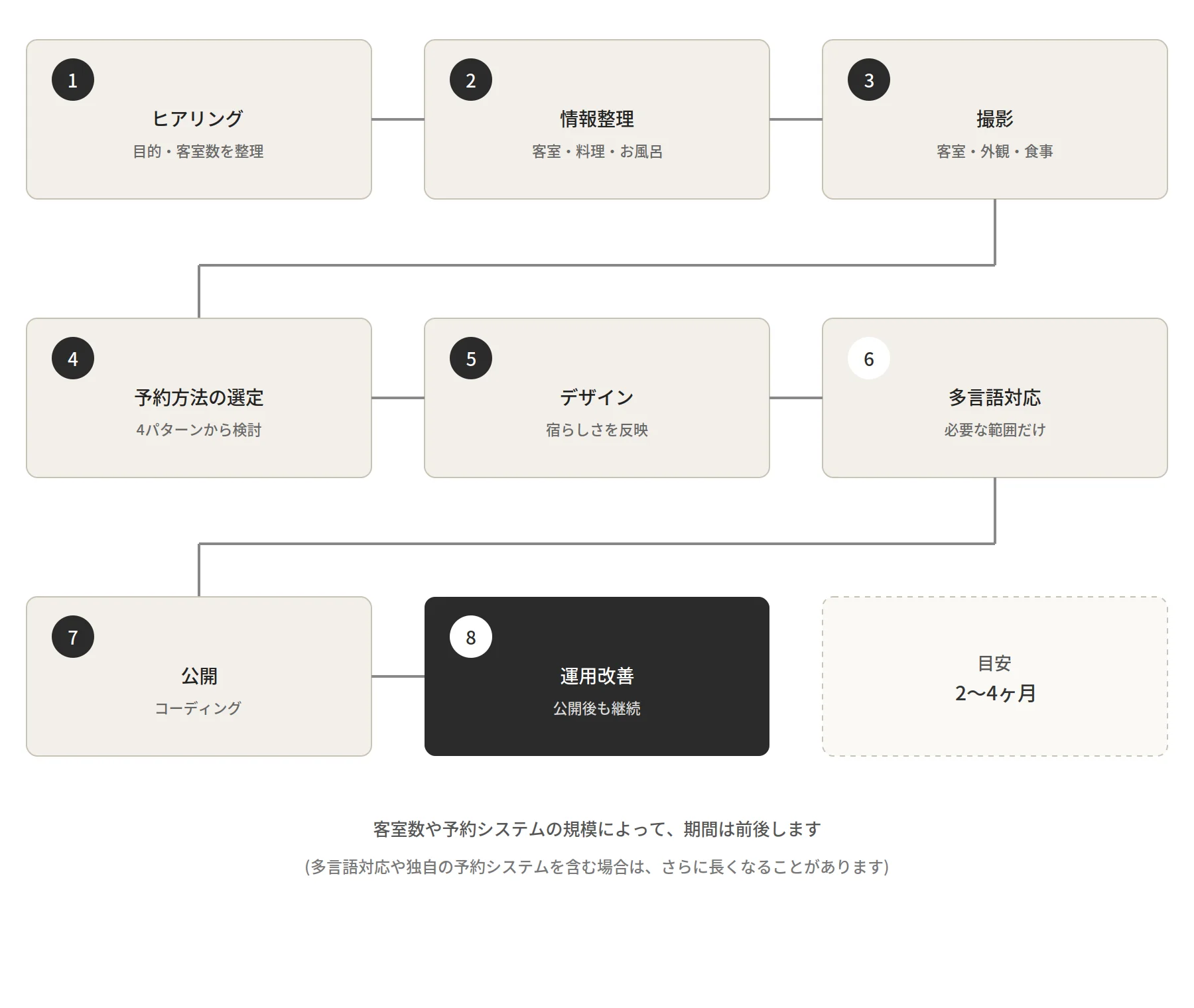
So far, we’ve discussed the content you want to convey. Now, let’s take a moment to outline the typical sequence of events once you actually commission the creation of a website. While the order may vary depending on the size of the inn and the specifics of the request, the general process is as follows.
Consultation
We’ll clarify your objectives and the number of guest rooms.
Information Organization and Photography
We’ll organize information about guest rooms, cuisine, and bath facilities while conducting the photo shoot.
Reviewing Booking Methods
We’ll simultaneously evaluate which reservation system to use.
Design
Based on the organized information and the chosen booking method, we translate these elements into a visual design.
Multilingual Support (if necessary)
If necessary, we will also implement multilingual support.
Coding
We implement the design as a fully functional website.
Launch and Maintenance
Even after launch, we’ll continue to manage the site while monitoring metrics such as traffic.
With this process in mind, let’s take a closer look at the “reservation system”—an area where people often have questions.
We also want to convey the joys of staying at the property on the website
While everyone enjoys travel in their own way, when choosing a hotel or ryokan, aren’t you likely to be curious about things like “what kind of food is served,” “what kind of baths are available,” and “what there is to do in the surrounding area”? If visitors can imagine not just the accommodation itself but also the time they’ll spend there, it changes the impression the website leaves.
What Kind of Food Can You Enjoy?
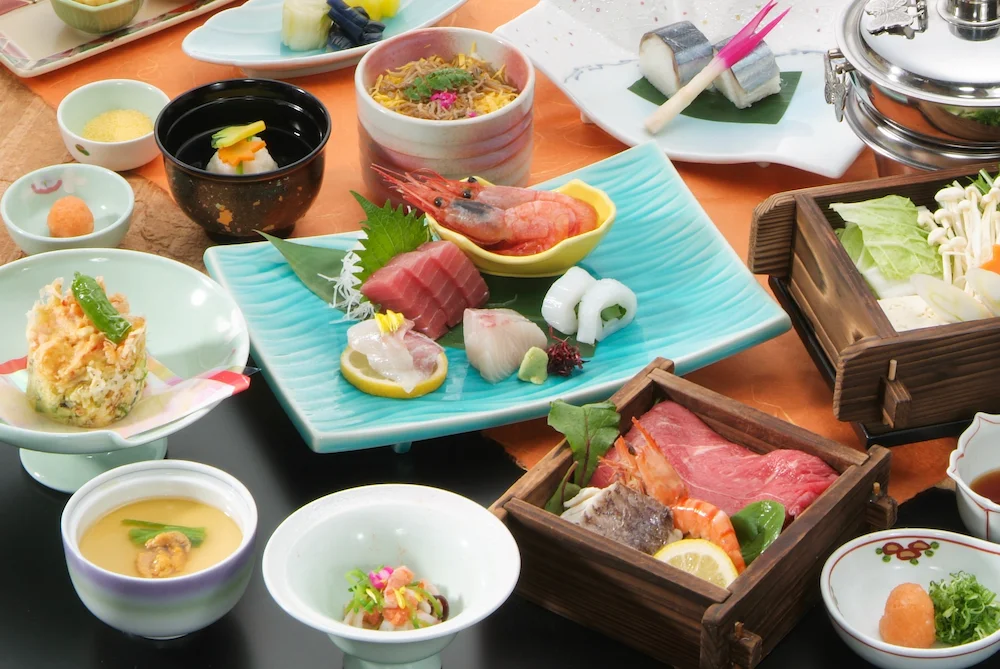
I think many people look forward to the food when choosing a hotel or ryokan. In addition to the details of dinner and breakfast, we should highlight local ingredients, seasonal dishes, kaiseki-style or set meals, dining locations, whether meals are served in the room, allergy accommodations, and children’s meals—as appropriate.Here, too, the goal isn’t simply to post lots of photos of the food. It’s about helping visitors feel, “If I stay at this inn, I’ll get to enjoy meals like these.” To achieve that, it’s a good idea to introduce not only the dishes themselves but also the inn’s philosophy regarding ingredients and cuisine.
What Kind of Baths Are Available?
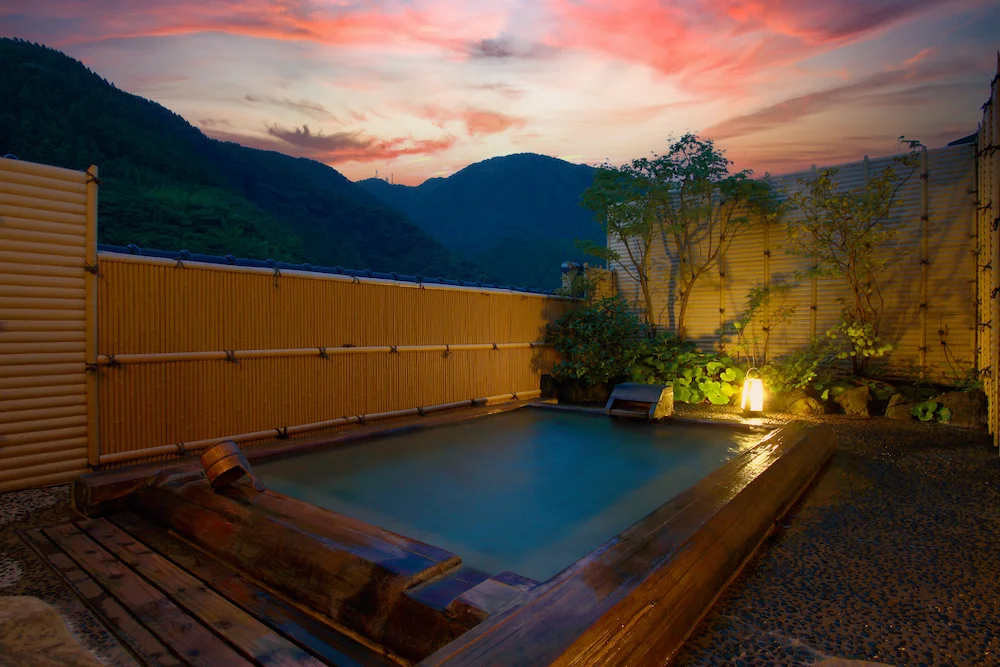
At a ryokan or hot spring inn, the baths are one of the main attractions. Is there a large communal bath or an open-air bath? Are there private baths or in-room baths? What kind of view can you enjoy while bathing? There’s also essential information to provide, such as the spring’s mineral composition and bathing hours.However, rather than simply stating, “We have an open-air bath,” it’s more effective to convey what kind of experience guests can have there—such as “You can bathe while gazing at the stars at night” or “A large communal bath bathed in morning light.” This helps guests more easily visualize their stay.
What sightseeing options are available in the area?
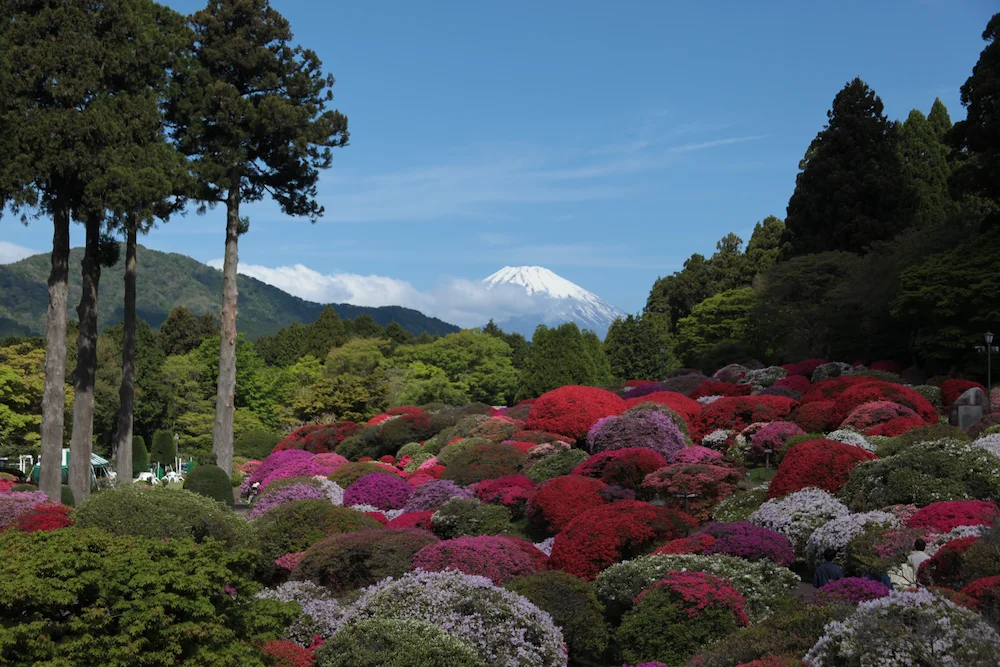
For guests, it’s not just what’s inside the inn that matters—they’re also interested in what there is to do in the surrounding area.It’s helpful to introduce nearby tourist spots, seasonal highlights, and places to take a stroll, along with their distance from the inn and how to get there. However, you don’t need to list every single piece of local tourist information on your website. Ask yourself, “What places would guests staying at this inn be happy to know about?” Thinking from that perspective will make it easier to select the necessary information.
Once a guest decides they “want to stay,” making the booking process easy is also crucial
Even if you’ve successfully conveyed the appeal of your property and guests think, “I’d like to stay here,” they may still abandon the process if the booking method is unclear. When designing a website for a hotel or ryokan, it’s important to consider not only the design but also the entire booking process.
There are several options for booking systems. Broadly speaking, there are four: using a WordPress plugin, using free or low-cost third-party services, using paid services designed for lodging facilities, and building a custom system. Let’s take a look at each one.
Using a WordPress Plugin
When building a website with WordPress, you can use plugins to add booking functionality. Popular examples include MotoPress Hotel Booking and VikBooking.
Service Examples | Estimated Costs | Key Features | Accommodations That Might Be Suitable |
MotoPress Hotel Booking | $139 per year per site, or a one-time purchase of $499 | Room, rate, and availability management; online booking; payment processing | Accommodations that want to integrate their website and booking functionality using WordPress |
VikBooking | Pro Plan: 149 euros; free version available | Room management, rate setting, reservations, payment processing, PMS features, and channel manager integration | Accommodations seeking relatively comprehensive reservation management on WordPress |
(As of September 2026, based on information from official websites. Prices are subject to change, so please check the respective official websites for the latest information)
One important point to keep in mind is not to oversimplify things by assuming that “since it’s a plugin, it must be cheap.” You need to consider not only the cost of the plugin itself but also server costs, WordPress setup and configuration, payment processing fees, and any additional add-ons you may need.
Using Free or Low-Cost Third-Party Services
Another option is to use an external booking service. Since these services provide their own booking pages and management features, you can simply direct visitors from your website to them. Examples include RESERVA and STORES Reservation.
Service Examples | Estimated Costs | Main Features | Accommodations That Might Be Suitable |
RESERVA | Free: Starting at 0 yen/month; Blue: Starting at 3,850 yen/month (annual payment) | Reservation processing, customer management, support for various accommodation types, Google Calendar integration | Small-scale accommodations; accommodations that want to try out a reservation system at a low cost |
STORES Reservation | Free from 0 yen/month, Small from 9,790 yen/month (annual contract) | Booking & Payment, Customer Management, Booking Page Creation | Accommodations that want to start with a simple booking system |
(As of September 2026)
If your lodging business is thinking, “I’d like to try implementing online reservations first,” you can start with these free or low-cost services. However, just because a service is free doesn’t necessarily mean there are no costs involved. Conditions vary by service—such as booking fees and payment processing fees—so be sure to check the details before signing up.
Using Paid Services for Accommodation Facilities
There are also paid services designed for hotels and ryokans that bundle all the features needed for reservation management. A prime example is “Nepan! Site Controller++.”
Service Examples | Estimated Costs | Main Features | Accommodations That Might Benefit |
Neppan! Site Controller++ | 5 rooms or fewer: Initial fee of 55,000 yen + monthly fee of 6,600 yen / 6 rooms or more: Initial fee of 55,000 yen + monthly fee of 10,780 yen | Centralized management of inventory, rates, and reservation information across multiple booking sites; integrates with PMS | Accommodations using multiple OTAs or those seeking robust inventory management |
(As of September 2026. There are no usage-based fees based on the number of reservations)
This service is designed for managing lodging reservations—including multiple booking channels such as Jalan and Rakuten Travel—rather than simply serving as a “booking form on your own website.” Your needs will vary depending on whether you want to “add a booking button to your website” or “manage multiple booking channels in one place.”
You can also build your own booking system
In addition to using existing services, you could also consider building a booking system tailored to your specific property.
Combining Systems | Estimated Costs | Accommodations That Might Be Suitable |
Jamstack (website) + Google Sheets (data management) + Google Calendar + booking form service | Varies depending on the scope of work | For small-scale accommodations or other cases where existing services offer too many features |
For small-scale accommodations where you can narrow down the necessary features, this setup may be a viable option for managing reservations. However, if you have a large number of rooms, handle multiple room types or rate plans, or require features like payment processing, cancellation policies, and inventory management, the system can quickly become complex.Whether it’s “technically feasible” and whether it’s “practical for the accommodation’s day-to-day operations” are two slightly different matters. Even when considering a custom system, it’s best to first clarify “what is actually needed” before moving forward.
Comparing the Four Methods at a Glance
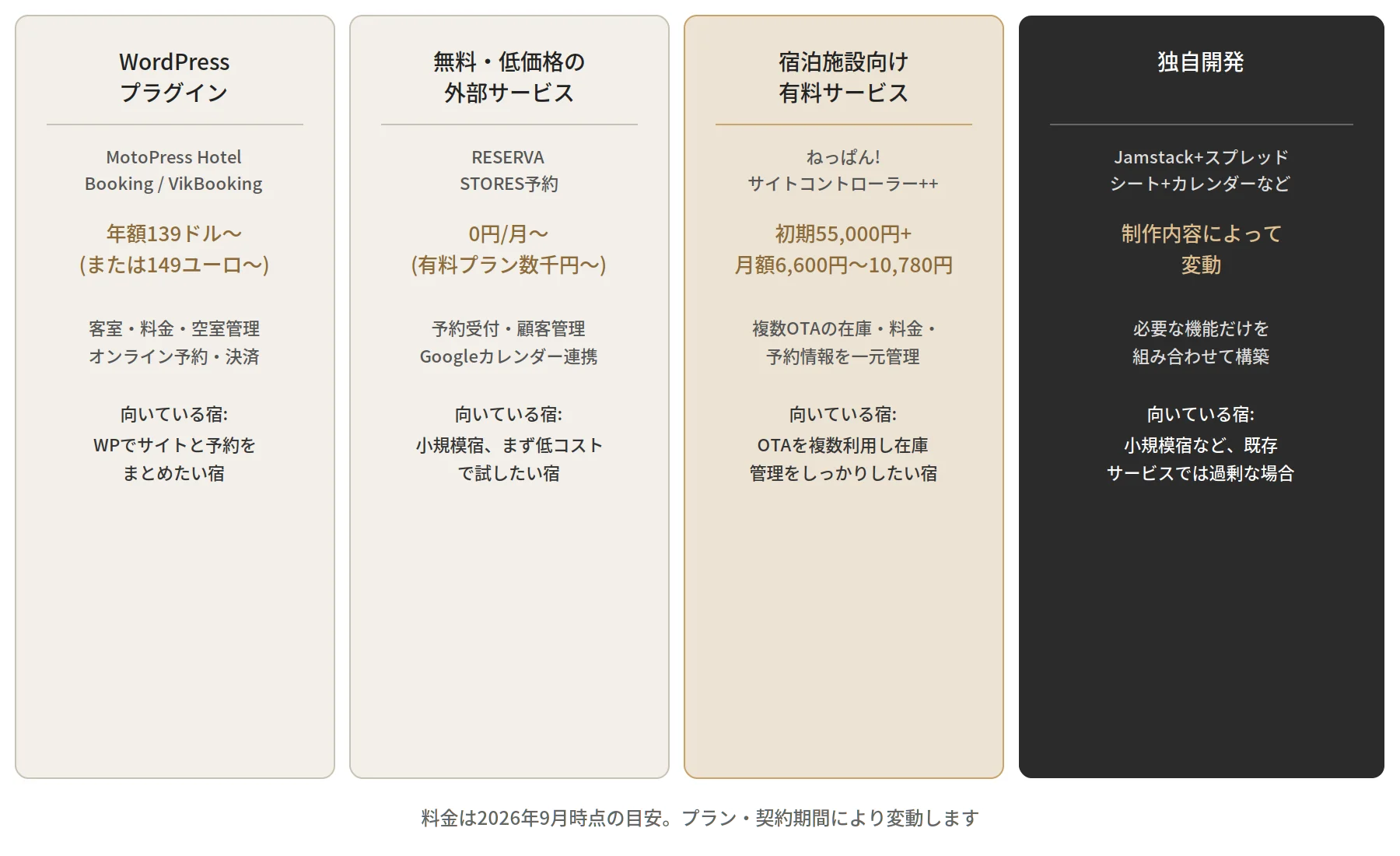
Method | Service Examples | Estimated Cost | Accommodations That Might Be Suitable |
WordPress Plugins | MotoPress Hotel Booking / VikBooking | Starting at $139 per year or €149 per year (depending on the plan) | Accommodations looking to integrate their website and booking functionality using WordPress |
Free or Low-Cost Third-Party Services | RESERVA / STORES Reservations | Starting at 0 yen/month (paid plans start at several thousand yen/month) | Small-scale accommodations or those that want to try it out at a low cost first |
Paid Services for Accommodation Facilities | Neppan! Site Controller++ | Initial fee of 55,000 yen + monthly fee ranging from 6,600 yen to 10,780 yen | Accommodations that use multiple OTAs and want to manage inventory effectively |
In-house Development | Jamstack + Google Sheets + Google Calendar, etc. | Varies depending on project scope | For small-scale accommodations or other cases where existing services offer too many features |
Prices are estimates based on information from each official website as of September 2026. They may vary depending on the plan and contract term, and booking or payment processing fees may apply separately, so please check each service’s latest pricing page when considering these options.
There are several options for reservation systems, ranging from free solutions to full-fledged services for accommodations, all the way to building your own custom system. However, it’s not simply a matter of choosing the cheapest option or the one with the most features.How many guest rooms do you have? How many reservations come in by phone? Do you use OTAs like Jalan or Rakuten Travel? Is online payment necessary? If you take the time to organize your property’s current booking methods, you’ll likely gain a clearer picture of the system you actually need.
A Reservation System Should Be “Right for Your Property,” Not Just “High-Functionality”
When it comes to reservation systems, you might be tempted to choose a service with the most features. However, not every property needs the same features. For a small property with few rooms and many phone reservations, a simple reservation form and calendar may be sufficient. On the other hand, a property with many rooms and plans may need a system that can manage availability and rates all in one place.If you have many international guests, multilingual support and online payment options will likely be necessary. Rather than simply “installing the most feature-rich booking system,” ask yourself, “What exactly does this property need?” That alone will change your choice.
Essential Information for Hotel and Ryokan Websites
Access
Address, map, nearest station, parking, directions by car, shuttle service, and directions from the airport or other locations. It’s reassuring to provide enough information so that even first-time visitors can visualize the route to your property.
On-Site Facilities
In addition to large public baths and restaurants, organize the information relevant to your property—such as lounges, gift shops, Wi-Fi, coin-operated laundry facilities, kids’ play areas, and accessibility features.
Frequently Asked Questions
Questions people have before booking vary from person to person, such as “What is the check-in deadline?”, “Can children stay here?”, “Is there parking?”, “What are the payment methods?”, and “What are the cancellation fees?” If there are frequently asked questions, it’s a good idea to compile them into an FAQ section.
Features and Information That Would Be “Helpful” Depending on the Target Audience
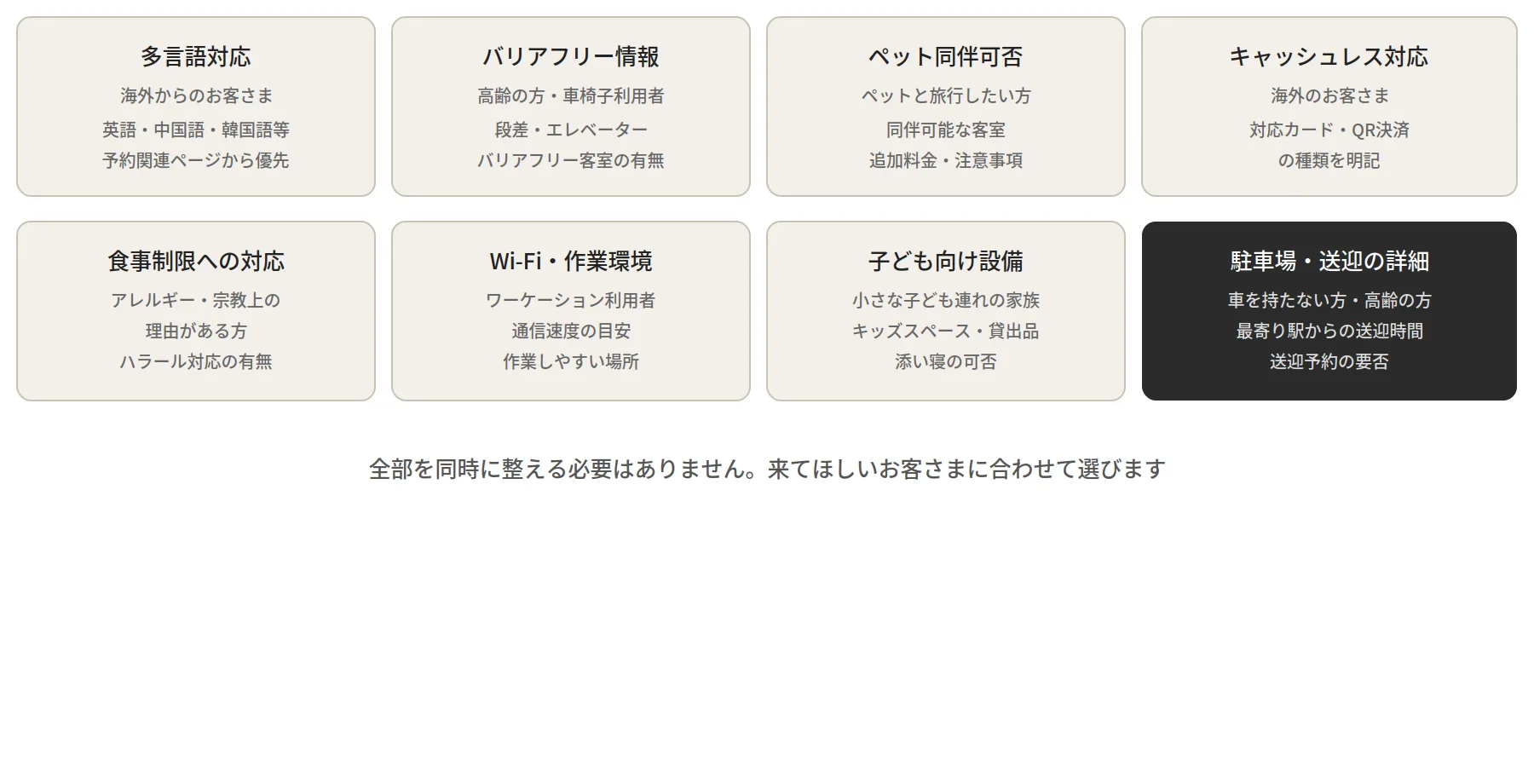
While not strictly necessary, certain features or information can be “helpful to have” depending on the type of guests you’re targeting. Multilingual support is one such example. Not every accommodation needs the same things; what should be prioritized varies depending on your target audience.
Item | Guests Who Would Find It Helpful | Specific Examples |
Multilingual Support | International guests | Information provided in English, Chinese, Korean, and other languages. It’s effective even if it’s limited to the sections related to reservations, rather than every page. |
Accessibility Information | Elderly Guests and Wheelchair Users | Information on steps, elevator availability, and accessible guest rooms |
Whether pets are allowed | For guests who wish to travel with pets | Pet-Friendly Rooms, Additional Fees, and Guidelines for Staying with Pets |
Cashless payment options | For international guests and those who prefer not to carry cash | Accepted credit cards and types of QR code payments |
Accommodations for dietary restrictions | For Guests with Allergies or Dietary Restrictions Due to Religious Beliefs | Availability of allergy-friendly options and halal meals |
Wi-Fi and Workspace | For those interested in workation | Estimated Internet Speed; Ease of Working in Guest Rooms and the Lobby |
Facilities for Children | Families with young children | Kids’ play areas, rental items, and co-sleeping policies |
Parking and shuttle service details | Guests without a car and elderly guests | Pickup time from the nearest station; whether reservations are required |
You don’t need to set everything up at once. It’s best to think about the type of guests you’d like to attract and start by organizing the information that best suits them.
One additional note: If you’re creating multilingual pages—especially in German or French to target European guests—you’ll want to give some thought to compliance with the GDPR (the EU’s General Data Protection Regulation) or, for the German market, the DDG (German Digital Services Act).Issues such as web analytics (e.g., Google Analytics), cookie handling, and how price information is displayed become different considerations compared to simply adding an English page. While this isn’t necessary for every accommodation, if you’re serious about significantly increasing bookings from Europe, it’s best to consult with an expert early on for peace of mind.
Common Mistakes on Hotel and Ryokan Websites
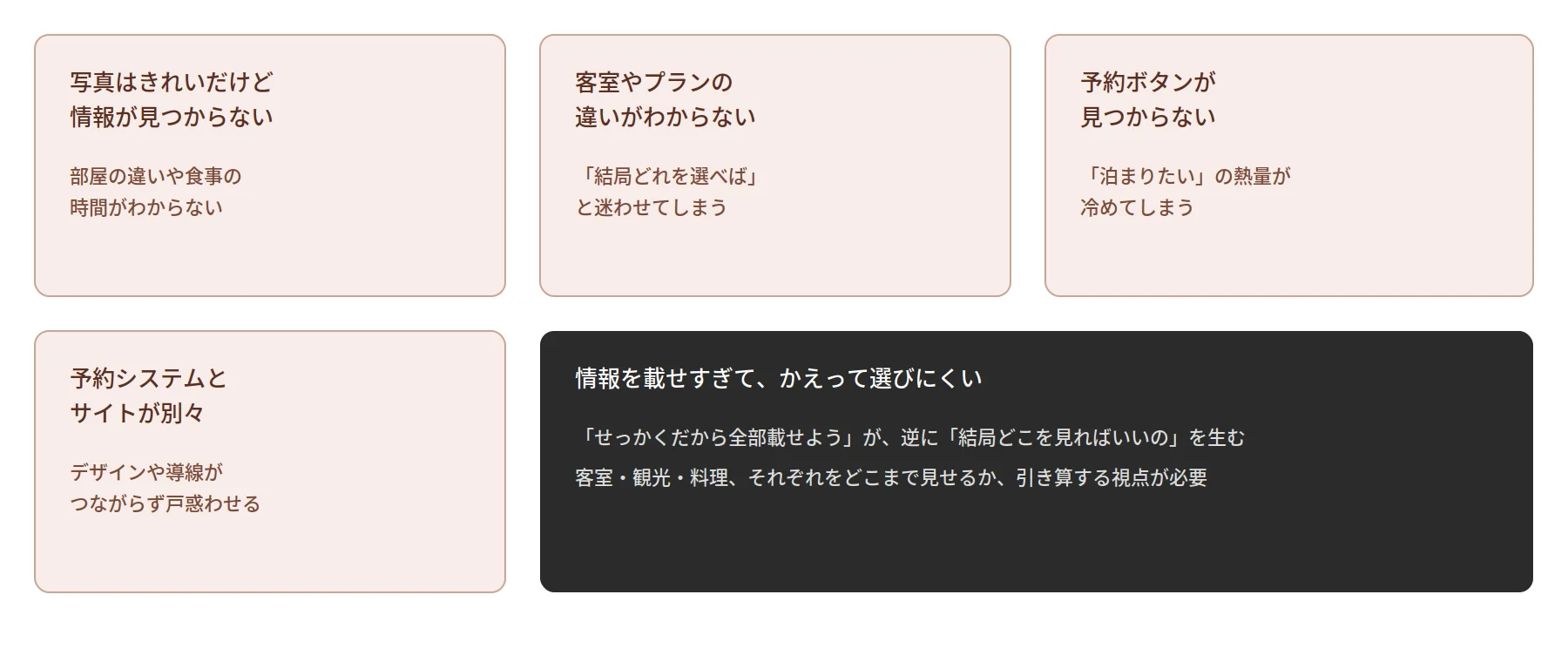
The photos are beautiful, but visitors can’t find the information they’re looking for
While the visual appeal of photos is very important, specific details are also necessary to make a reservation. “The photos are beautiful, but I can’t tell the difference between the rooms,” “I don’t know the meal times,” “I can’t find the bathhouse hours.” In situations like these, potential guests will be left confused.
Unclear Differences Between Rooms and Plans
The more room types and stay plans you offer, the more likely visitors are to wonder, “Which one should I choose?” Simply organizing the differences between each option in an easy-to-understand way can make the selection process much smoother.
Can’t Find the Booking Button
It’s a bit of a waste when someone looks at your website, thinks, “I’d like to stay here,” and then has to search for the booking page. You’ll want to design a natural flow within the page that guides visitors seamlessly to the booking process.
The booking system and website are separate
Even if the booking system itself is convenient, users may become confused if its design and navigation aren’t seamlessly integrated with the website. When selecting a booking system, it’s a good idea to consider not only its features but also how well it integrates with your website.
Too Much Information Makes It Harder to Choose
“Since we’re going to the trouble of creating a website, let’s put everything on it.” I completely understand that mindset. However, just because there’s more information doesn’t necessarily mean the site becomes easier to navigate.If you have many guest rooms, how should you organize them? If you have a lot of tourist information, how much should you include? If you have many photos of dishes, which ones should you showcase? Keep the necessary information while letting go of what’s unnecessary. This kind of curation may be essential for hotel and ryokan websites as well.
If you have a lot of information, you don’t have to cram it all onto one page
When creating a website for a hotel or ryokan, you might wonder, “Should I try to fit everything onto a single page?” However, if you have a lot to share—such as guest rooms, cuisine, baths, and sightseeing information—there’s no need to force everything onto a single page.Dividing the content into separate pages—such as guest rooms, cuisine, hot springs, on-site facilities, nearby attractions, access, and FAQs—can actually make it easier for visitors to find the information they’re looking for.
What matters isn’t just “how much information to include,” but “how to organize that information.” Dividing the content into separate pages is precisely because there’s so much information. This approach should be considered as one of the options when building a website.
What Factors Affect the Cost of Creating a Hotel or Ryokan Website?
As we’ve seen so far, creating a website for a hotel or ryokan involves more than just building pages. Factors that affect production costs include the number of pages, design, photography, copywriting, a content management system (CMS), multilingual support, a reservation system, integration with external services, custom system development, and post-launch updates and maintenance.
Do you already have the photos, or will they need to be shot from scratch? Will you use an external service for the reservation system, or build your own? Do you need an English page?Will there be a separate page for each guest room, or will they all be consolidated onto a single page? Each of these choices will affect the scope of work required. Rather than making a decision based solely on a price tag like “Website Development Cost: X Ten Thousand Yen,” it’s important to examine exactly what is included in that price.
Key Points to Consider When Choosing a Web Design Agency
Do they have experience implementing and integrating reservation systems?
Unlike general corporate websites, hotel and ryokan websites are designed with integration with a reservation system as a prerequisite. There are differences between companies in terms of their familiarity with various methods—such as experience implementing WordPress plugins, a track record of integrating with external reservation services, or experience with in-house development. It’s reassuring to ask about their track record with the specific reservation method you’re considering.
Can they handle photography and copywriting?
The quality of photos and copy plays a major role in conveying the appeal of guest rooms, cuisine, and bath facilities. Is photography billed separately, or is it included in the package? Will the copy be written based on an interview with you, or will you need to provide it yourself? Confirming these details in advance will help you better understand the preparation workload.
Scope and Methods of Multilingual Support
If multilingual support is required, both cost and quality will vary depending on whether machine translation is used, if human translation is employed, and the scope of the service. Rather than simply saying, “We’ll translate every page for now,” consider whether the company will work with you to determine which pages should be prioritized—this is an important factor in your decision.
Scope of Post-Launch Updates and Maintenance
Room information, packages, and rates often change seasonally. Will you be able to make updates yourselves, or will you need to request them each time? Will there be a fee for each update, or are they included in the contract? Since this is a website you’ll be using for the long term, it’s important to confirm the post-launch management plan as well.
Frequently Asked Questions About Hotel and Ryokan Website Development
Can the reservation system be changed later?
In most cases, changes are possible. However, migrating from one third-party service to another, or switching from a plugin to a custom system, may require data migration and adjustments to the website itself. If you anticipate an increase in the number of rooms or plans in the future, letting the agency know during the initial consultation will make it easier for them to design a structure that accommodates future changes.
Do I need both an OTA (such as Jalan or Rakuten Travel) and my own website?
Many accommodations use both. OTAs serve as an easy way to reach new customers, while your own website can convey the unique appeal of your property in detail and allow guests to book directly at better rates than those offered through OTAs. It’s easier to manage if you think of them as having distinct roles rather than relying on just one.
Should I implement multilingual support for everything from the start?
Not necessarily. The priority depends on how many international guests you currently have and whether you plan to increase that number in the future. One approach is to start by making only the key booking-related pages multilingual, then expand the scope gradually as you assess the situation.
Is it okay to take the photos ourselves?
There’s no problem with using existing photos. However, since the impression of guest rooms and bathrooms can vary significantly depending on lighting and angles, many accommodation websites hire professionals to take at least the photos of meals and guest rooms. Depending on your budget, it’s a good idea to discuss how much of the photography you should entrust to a professional.
Summary | Create a Website That Conveys, “What Kind of Experience Will I Have If I Stay Here?”
For hotel and ryokan websites, it’s important not only to showcase guest rooms and rates but also to convey what kind of experience guests can expect at your property. What kind of meals can they enjoy? What kind of baths are available? What sightseeing options are in the surrounding area? And when a visitor thinks, “I’d like to stay here,” can they book without hesitation?
Even when it comes to the booking system alone, there are several options—WordPress plugins, free or paid third-party services, or custom-developed solutions. Rather than there being a single “right” answer, the ideal system depends on the property’s size, booking methods, and required features.
The same applies to the website. The goal isn’t to cram in as much information as possible, but to ensure that the information guests need to choose your property is exactly where they’ll look for it. Keep what’s essential and let go of what isn’t. If there’s still a lot you want to convey, don’t cram it all onto a single page—instead, organize it across separate pages.If you approach the creation of a hotel or ryokan website with this mindset, you may begin to see a form that truly reflects the unique character of your establishment.
 Contact Form


 Related Articles