

Hello, this isKototsuki Design.
You stand in line at the register, take out your wallet, and pay. If those final few seconds drag on or feel confusing, what should have been a “great shopping experience” can turn into a slightly disappointing memory.
It’s surely the same for e-commerce sites. The product photos are stunning, the description resonates with you, and you add it to your cart with a “I’ll take this.” Only when the checkout process that follows proceeds smoothly does it become a truly satisfying shopping experience. That’s what we believe.
Right now, there’s a steady stream of news from the e-commerce platform “Shopify” regarding those “final few seconds.” In this article, we’ll analyze that news and explore how to create an “easy-to-shop” experience on e-commerce sites.
*This article is based on information current as of October 11, 2026.
Key Points of This Article
- Five Shopify checkout extensions reduce data transfer size by 40.5–84.4% and shorten median load times by approximately 8% (note: this is not “85% faster”)
- On September 28, 2026, a system was also announced that allows AI agents to complete purchases at Shopify stores
- 67.0% of Japanese e-commerce users have left a site due to slow loading times (Repro survey)
- On average, 70.22% of shoppers abandon their carts. Many of the reasons for this can be addressed by improving the site’s design
- Choose between “Shopify alone” and “Shopify + microCMS” based on the balance between design flexibility and effort required
- If you’re reviewing your current site, we recommend first measuring its loading speed and the fundamentals of its search functionality
Shopify’s checkout extension is now up to 84.4% lighter
What Happened?
On October 9, 2026, the tech news site InfoQ featured a post from Shopify’s engineering blog. The source was a technical article published by Shopify on July 16, 2026.
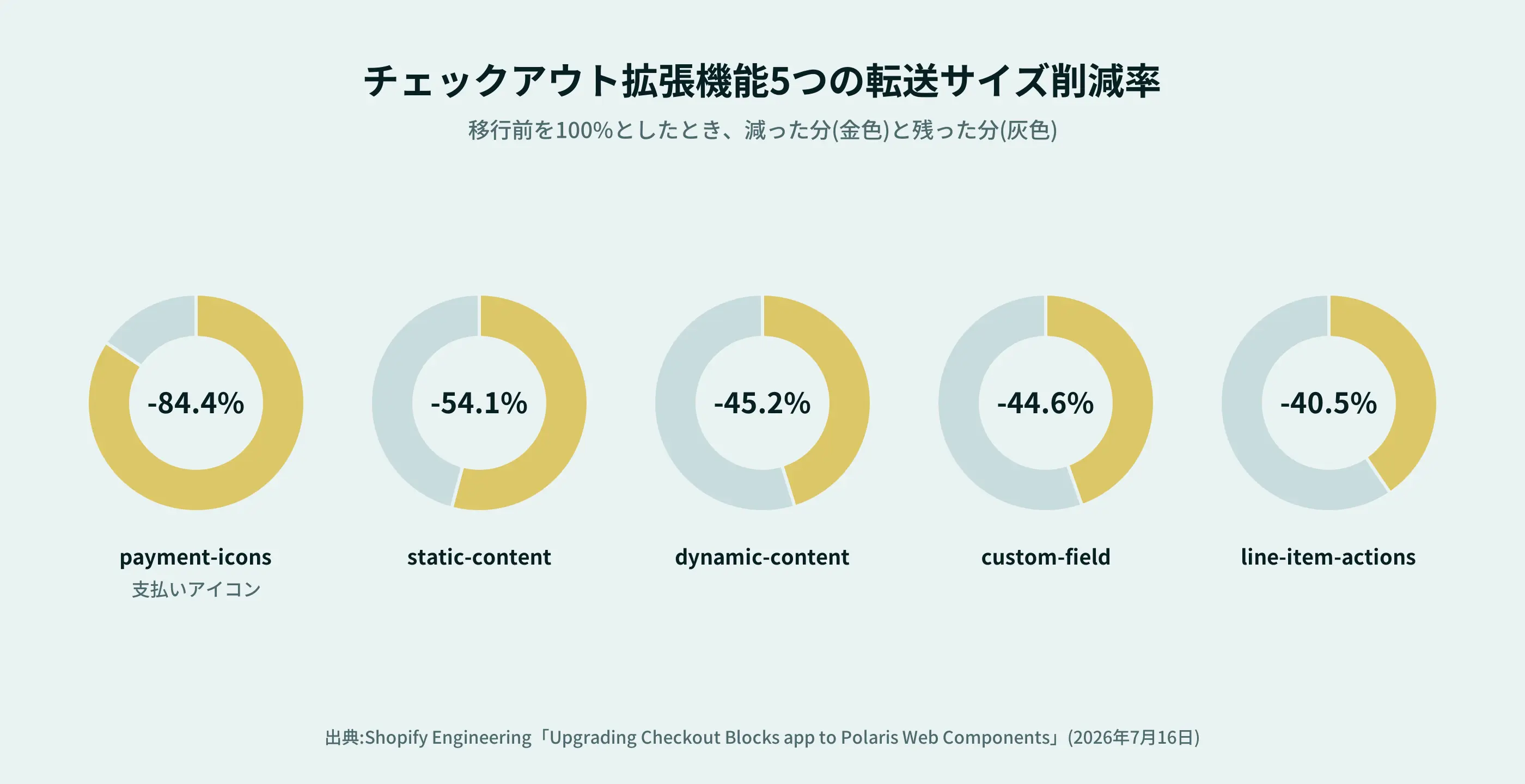
They migrated the five most-visited “extensions” displayed on the checkout page to a new architecture—from React to Preact, and then to Polaris Web Components. While these are technical terms, in simple terms, it means they “replaced the programs that power the site with lighter components.”The results are as follows.
Extensions | Reduction in Data Transfer Size |
payment-icons (payment method icons) | -84.4% |
static-content | -54.1% |
dynamic-content | -45.2% |
custom-field | -44.6% |
line-item-actions | -40.5% |
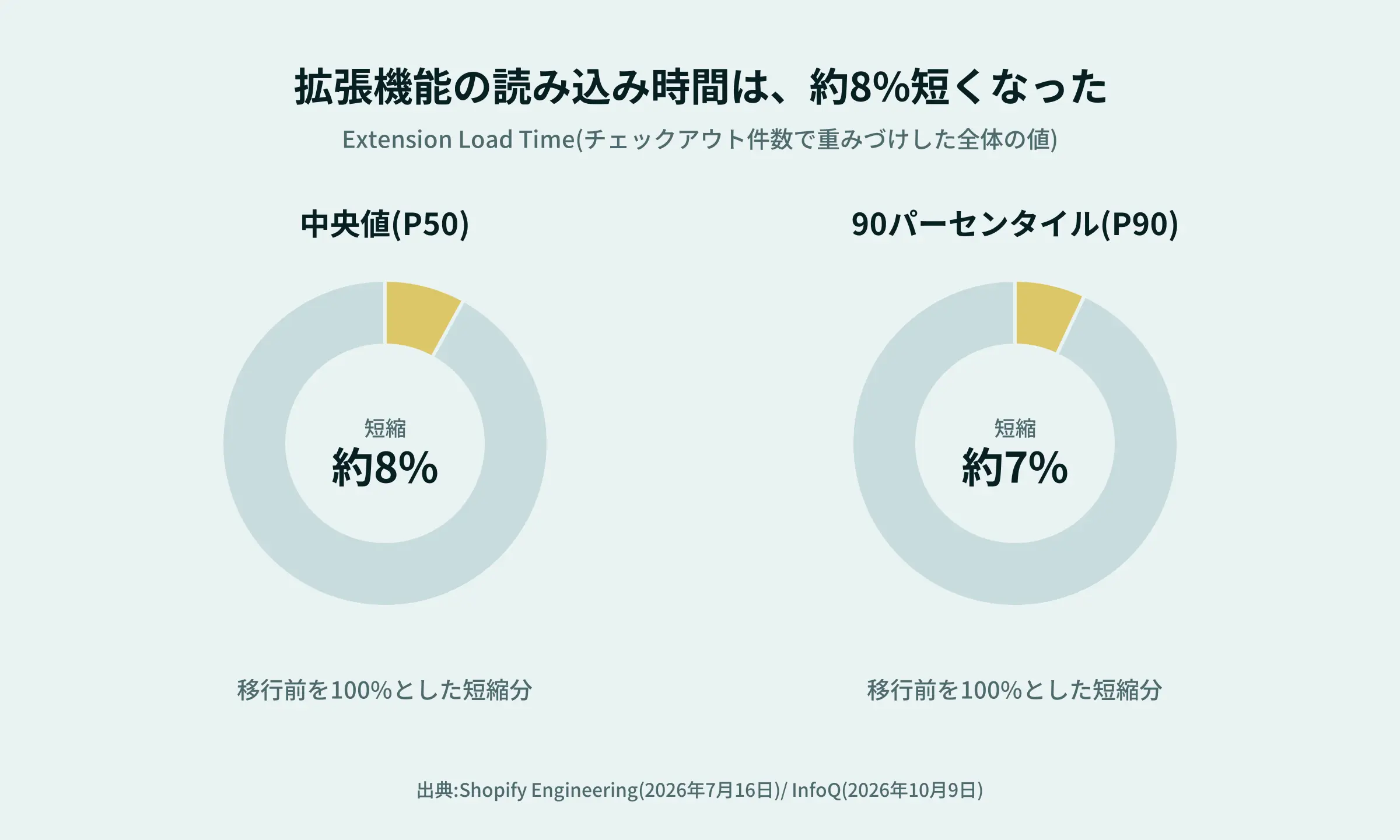
Extension load time—a metric weighted by the number of checkouts—also decreased, with the median decreasing by approximately 8% and the 90th percentile by approximately 7%.
Reference
- Shopify Engineering | Upgrading the Checkout Blocks app to Polaris Web Components
- InfoQ | Shopify Migrates Checkout Extensions to Web Components
Please be careful how you interpret the “85%” figure
If you look only at the news headline, you might interpret it as “Shopify’s checkout has become 85% lighter,” but that is not the case.
- The figure refers to five of the extensions displayed during checkout.
- The largest reduction was in the display of payment icons, at -84.4%. The smallest reduction was -40.5%.
- The reduction refers to the “transfer size” (the amount of data downloaded); it does not mean that the overall loading speed of the checkout page has increased by 85%.
- The improvement in load time is approximately 8% on a median basis.
Looking at the numbers alone, the speed improvement is “surely, slightly” rather than “dramatic.” Still, I believe this is an improvement that will gradually make a difference on the purchase page, which many people visit every day. Steadily refining the less noticeable details—I really enjoy that kind of work.
What exactly is “bundle size,” anyway?
Roughly speaking, “bundle size” refers to the total size of the bundled programs required to run a website’s features.
Imagine carrying a load. If the items you need are packed compactly, the amount you have to carry decreases. The same applies to websites: if the code loaded by the browser is lighter, it can potentially reduce the burden of downloading and processing.A technical article on Shopify mentions that a limit of 64 KB (after gzip compression) has been set for the size of each extension. Since the limit used to be around 100–112 KB, this means the size has been significantly reduced.
However, actual page load speed depends on various factors, such as network conditions, image file sizes, and server response times. Just because the code is lighter doesn’t mean everything will load faster. The point I want to make here is that “optimizing the invisible behind-the-scenes aspects also contributes to a better user experience.”
How Much Does Page Load Speed Affect Bounce Rates?
As mentioned earlier, the optimization reduced the median load time by about 8%. Looking at the numbers alone, this may seem like a small improvement, but from the customer’s perspective, how significant is this “slight” improvement? Let’s examine the results of a survey of Japanese e-commerce site users.
Two out of three people have left a site because it was slow
A survey conducted by Repro Inc. of 1,200 men and women aged 15–69 who had used an e-commerce site within the past month(conducted in December 2024, published in March 2025) found that 67.0% of respondents had left a site due to slow loading speeds, and 53.4% had given up on making a purchase as a result.
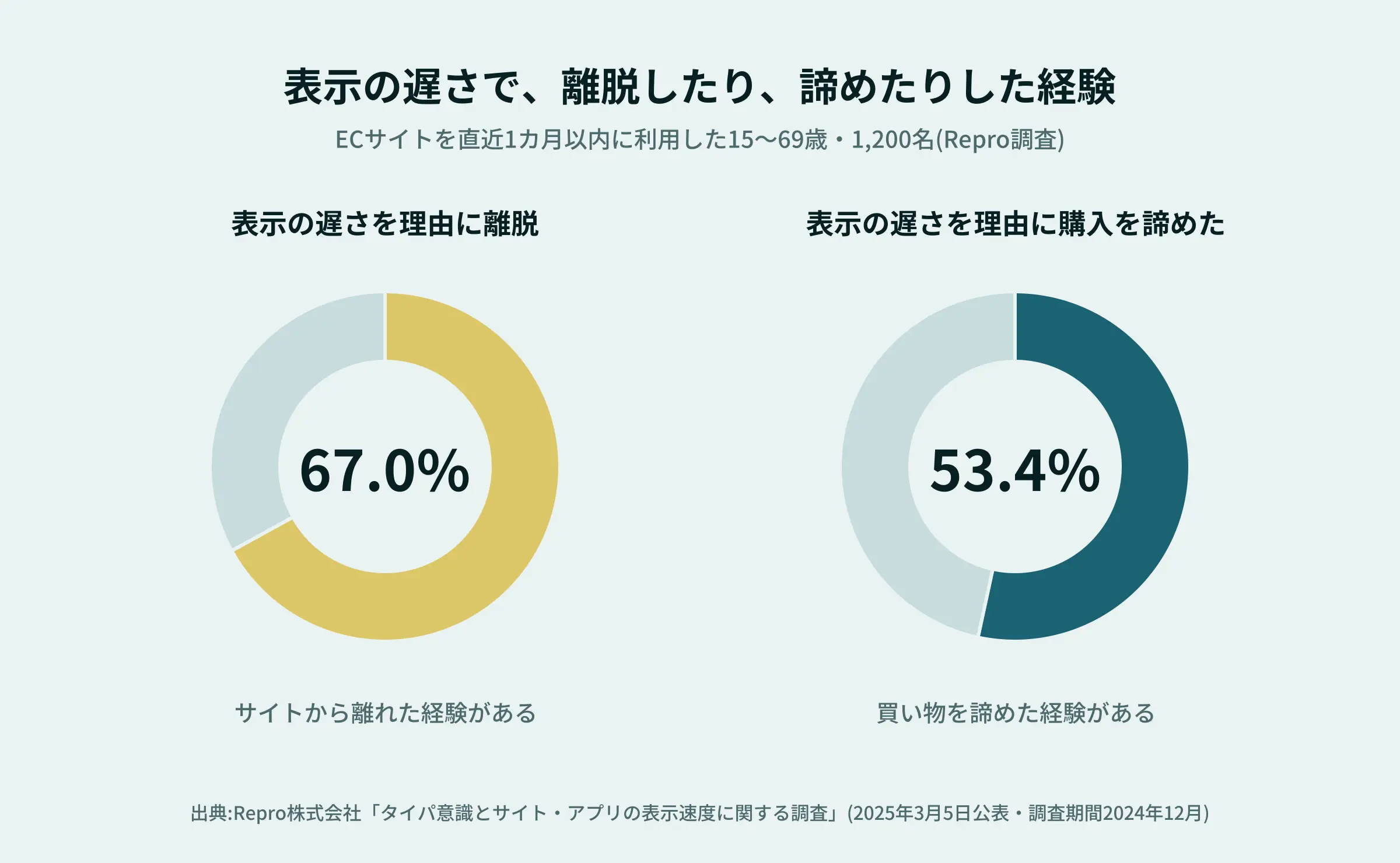
The reasons for leaving (multiple answers allowed) were “slow page loading speed” at 69.5%, “the page was unresponsive” at 43.5%, and “too many ads or pop-ups that interfered with navigation” at 25.3%.It is not just slowness, but also “lack of responsiveness when interacting with the site” and “feeling interrupted” that drive users away.
Users start perceiving a site as “slow” after 3 seconds
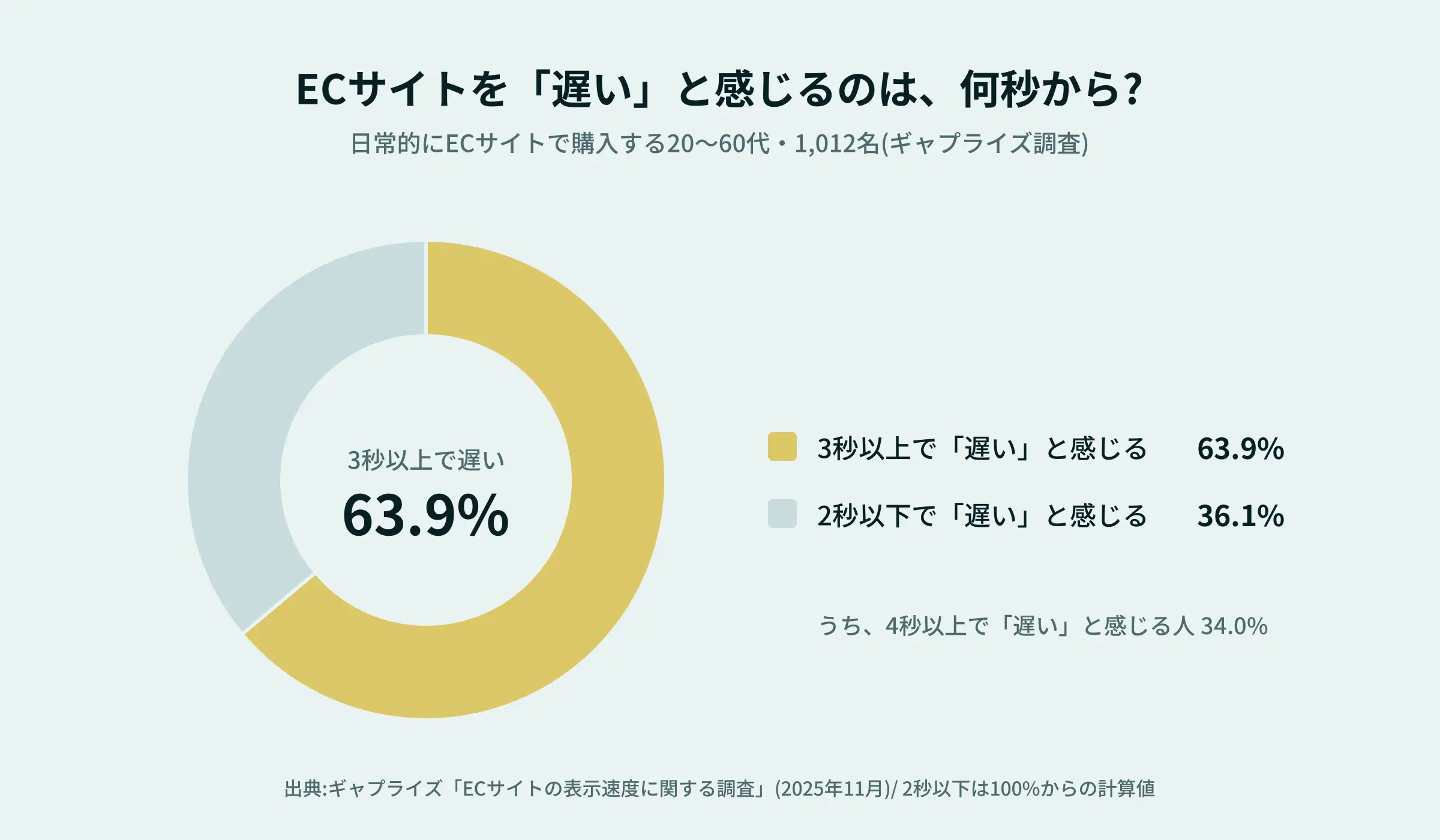
According to a survey conducted by Gapraise in November 2025 among 1,012 people in their 20s through 60s who regularly make purchases on e-commerce sites, 63.9% of respondents said they consider an e-commerce site “slow” if it takes 3 seconds or longer to load.Of those, 34.0% said they consider a load time of 4 seconds or more to be “slow.” Additionally, 21.0% feel a site is “slow” even at 2 seconds.
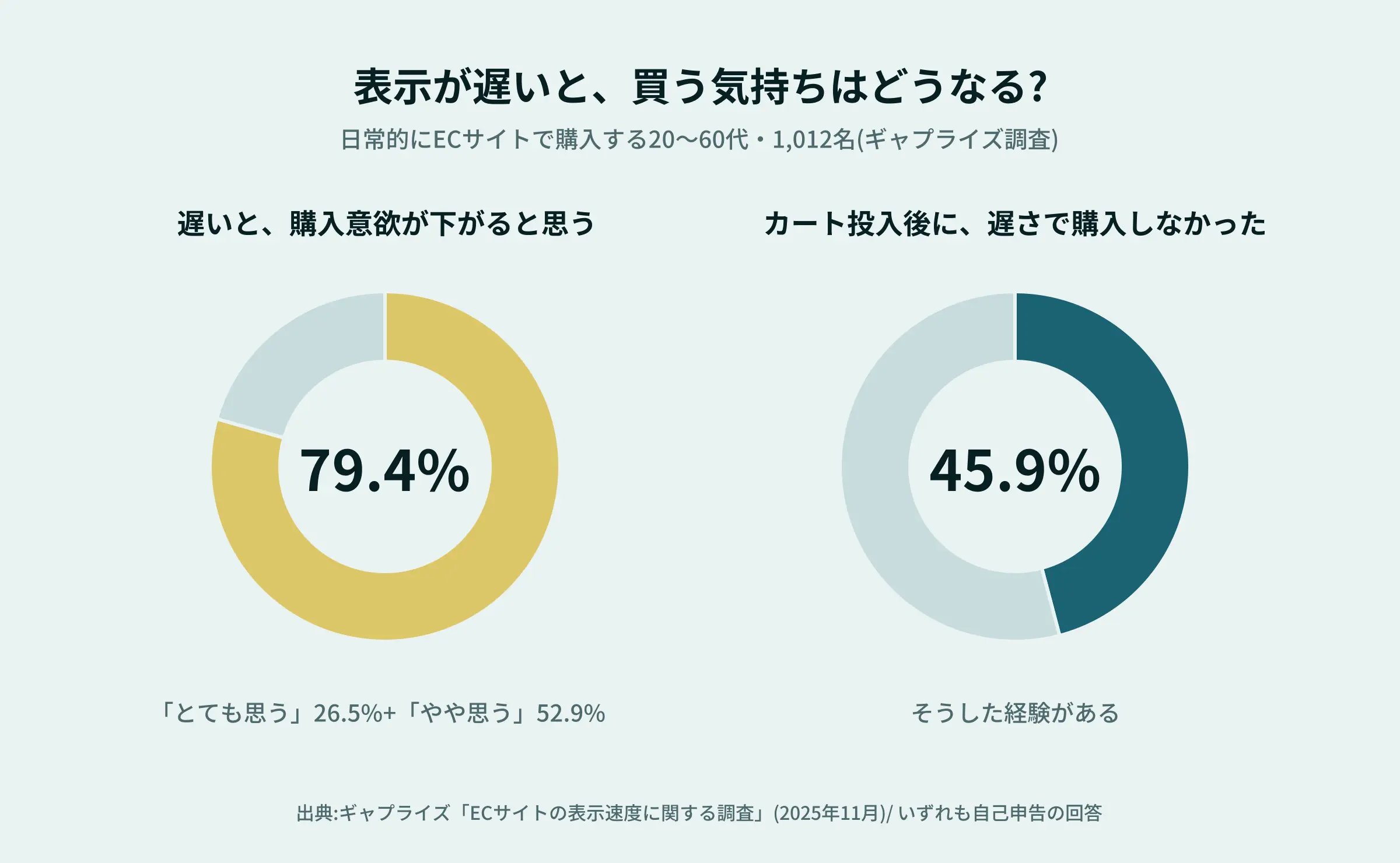
What’s even more concerning is how customers feel after making a purchase. After using a slow e-commerce site, 28.1% of respondents said their “trust in the product or seller decreased,” while 21.4% said, “I’ll buy the product, but I don’t want to use that site again.”Slow loading times may affect not only whether a customer makes a purchase at that moment, but also whether they will return in the future.
Source
: Online Store Managers Forum | Gaprise Survey (November 2025)
How to Interpret the Numbers and Our Assessment
These figures are based on self-reported responses from user surveys. They do not represent results measured from actual access data tracking bounce rates by the second. Furthermore, since the survey samples and questioning methods vary from one study to another, the numbers cannot be compared directly. It is important to note that this data does not provide sufficient evidence to definitively state, “If the loading time exceeds X seconds, Y% of users will leave.”
Nevertheless, multiple surveys indicate that many Japanese e-commerce users have experienced abandoning a page or canceling a purchase due to slow loading times. It also appears that once the loading time exceeds about 3 seconds, the majority of users begin to perceive the site as “slow.”
When the checkout line at a store is long, it’s a relief when a clerk says, “Thank you for waiting,” isn’t it? I believe that a website’s loading speed conveys that same sentiment of “we won’t keep you waiting”—not through words, but through action. Shopify’s recent figure of about 8% may be just a small step, but I see it as part of a series of such thoughtful gestures.
The era of AI handling the checkout process is approaching
Announcement on September 28, 2026
According to reports from TechCrunch and others, it was announced on September 28, 2026, that AI agents running within browsers will be able to complete purchases at Shopify stores.
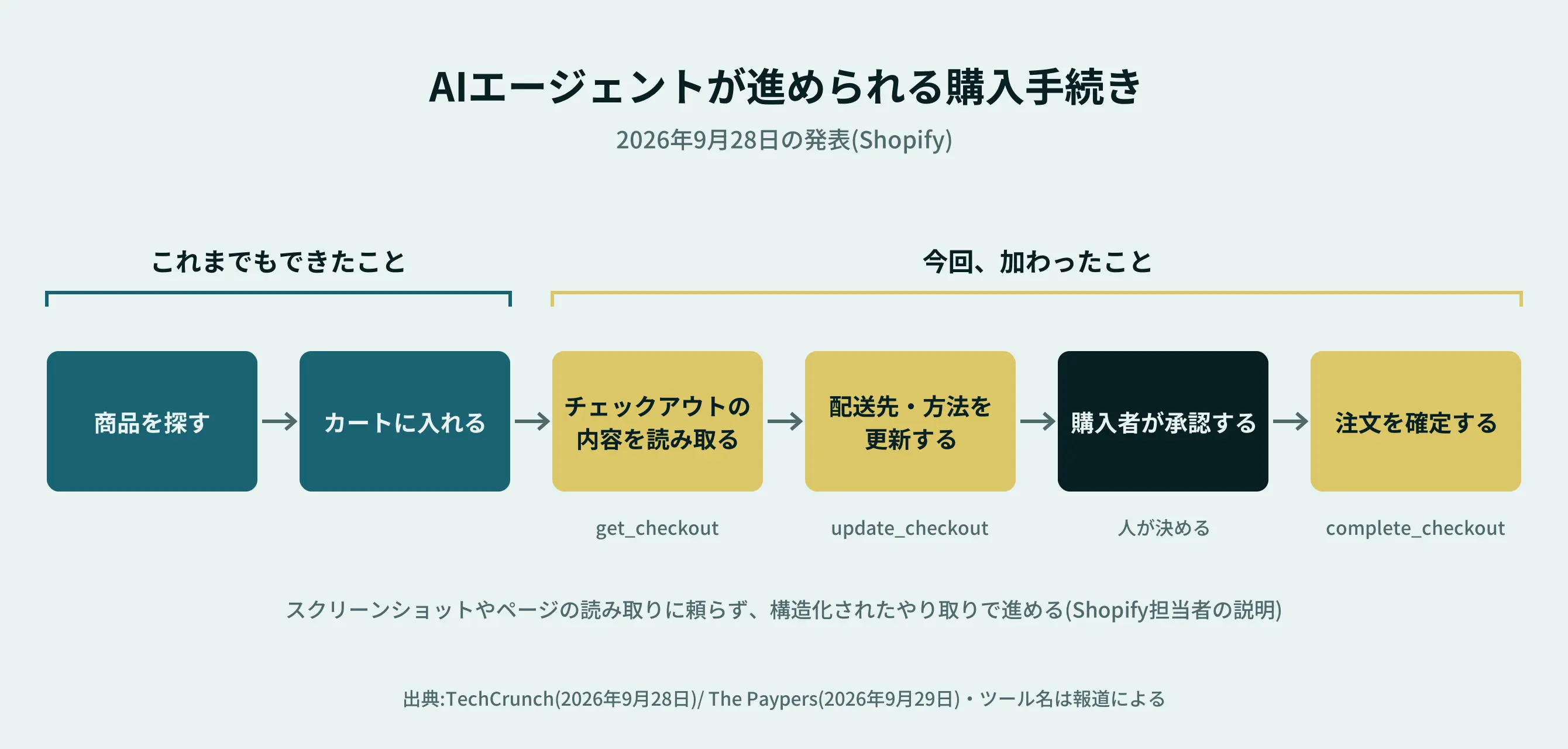
Until now, the process only went as far as searching for products and adding them to the cart. Under the new system, the agent will read the checkout details, update the shipping address and delivery method, and confirm the order after the buyer’s approval. This also applies to Shop Pay transactions and will be rolled out gradually to “all eligible Shopify merchants.”
The article notes that Amazon is blocking AI agents from making purchases on behalf of users. Shopify, on the other hand, is taking the opposite approach.
In fact, this is part of a trend that has been ongoing since June,
so this move isn’t sudden.
In the “Spring ’26 Edition” (which included over 150 new features) announced in June 2026, Shopify had already positioned “Agentic Commerce” (shopping via AI) as a major pillar.Through a system called “Agentic Storefronts,” it enables merchants to sell products not only via the Shop app but also through ChatGPT, Microsoft Copilot, Google AI Mode, Gemini, and other platforms. According to Shopify Japan’s announcement, the admin dashboard allows merchants to monitor the status of these AI channels and check whether their products are appearing in AI search results.
It seems reasonable to view these updates as a two-phase process: June focused on preparing for “getting products discovered within AI,” while the end of September focused on preparing for “guiding customers through the checkout process.” However, the article did not explicitly state the scope of availability in Japan.
Reference
- TechCrunch | Shopify opens checkout to browser-based AI agents
- The Paypers|Shopify Extends WebMCP Support to Checkout for AI Agents
- MarkeZine|Shopify Japan Announces Latest Update Expanding AI Features and Agent-Based Commerce (June 19, 2026)
*We were unable to confirm when or to what extent this will be available to merchants in Japan. The reports also did not include any figures indicating actual usage. The following represents our own analysis.
Our Thoughts on This News
1. The number of parties involved in ensuring “ease of purchase” may increase. Until now, the checkout process has been something people completed by looking at the screen and tapping buttons.Going forward, there will be situations where AI takes over this process. What makes it easy for humans to navigate and what makes it easy for AI to interpret are actually quite similar: input fields are organized, and shipping and payment options are clearly defined. A checkout process like this should be user-friendly for both humans and AI.
2. It will become more important than ever to ensure that basic product information is properly organized. When AI selects products, it doesn’t make judgments based on the atmosphere of a photo or the feel of a page, as humans do.I believe what matters most is whether information such as net weight, place of origin, storage instructions, and shipping conditions is organized—both in text and as data. Even for products where the “backstory” or narrative is important, the basic information must be presented accurately and clearly. That forms the foundation.
3. Even so, the “reason for being chosen” will still be captured in words and photos that resonate with people. Even as AI begins to handle purchases on our behalf, the desire to “give this as a gift to someone” or “try something from that shop” will continue to arise from within people.Stories from producers and appetizing photos aren’t going away. In fact, I believe that stores that offer both “well-organized information” and “memorable expressions” will become stronger.
Looking at these two news items side by side, it appears that Shopify is moving not only toward making the checkout process “faster and simpler,” but also toward “opening it up to non-human entities.”
“Ease of purchase” means designing the entire journey leading up to the purchase
About 70% of people who add items to their cart abandon it
On e-commerce sites, it’s crucial to get customers to look at a product page and think, “I want this.” But that’s not the end goal. Customers then add the item to their cart, enter their shipping address, select a payment method, and confirm their order.
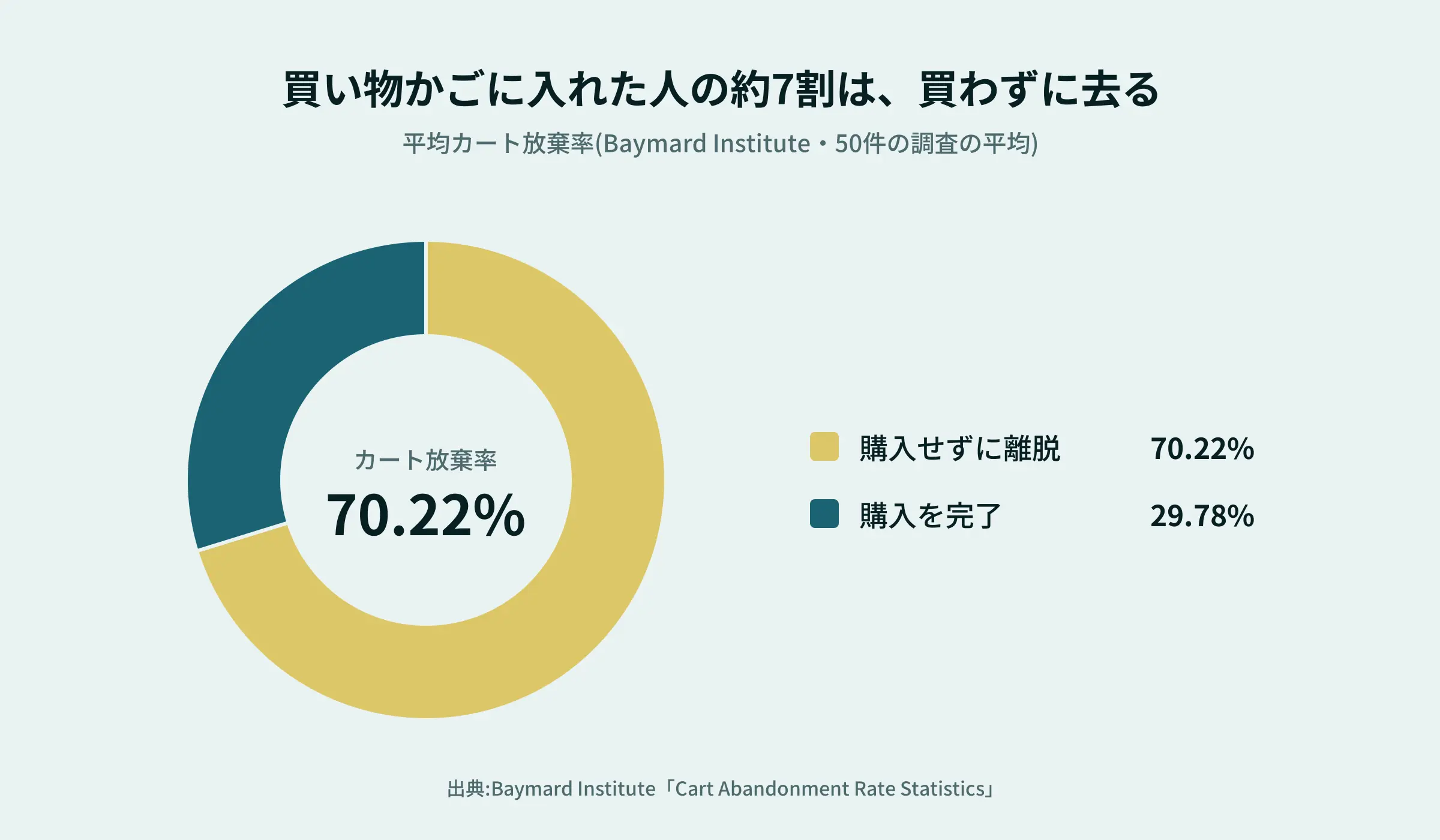
How many customers drop off along the way? According to the Baymard Institute’s analysis of 50 studies, the average shopping cart abandonment rate is 70.22%.
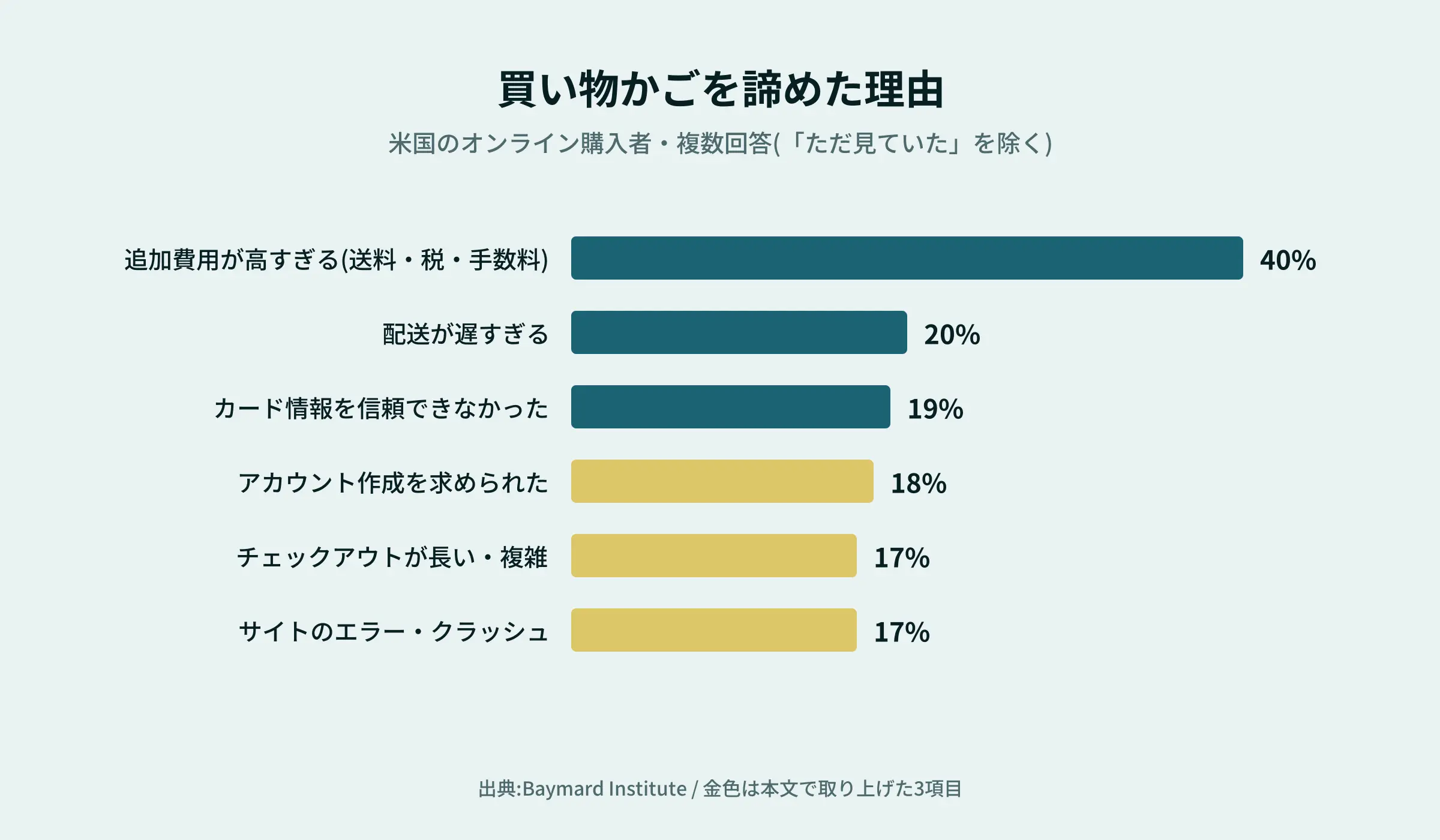
Looking at the reasons, “the checkout process is too long or complicated” accounted for 17%, “being required to create an account” for 18%, and “site errors or crashes” for 17%. These are all factors that can be addressed by improving the design of the checkout page.
Since this is a U.S. study, it may not apply directly to Japanese e-commerce. Nevertheless, I believe we cannot overlook the fact that “making customers feel burdened at the very last moment” can lead to cart abandonment.
Reference
: Baymard Institute | Cart Abandonment Rate Statistics
Kototsuki DesignOur Perspective on “Design of the Invisible Elements”
When people think of design, many imagine the visible elements—such as colors, photos, and text layout. Of course, those are very important. But the design we’re talking about isn’t limited to just that.
- Pages loading smoothly
- Being able to find the necessary information immediately
- Being able to proceed through the checkout process without getting lost
- Being able to navigate the site stress-free on a smartphone
- Ensuring the store can be managed and operated without undue burden
These less visible aspects shape the user experience. A site that’s naturally easy to use—even without customers realizing it—requires careful attention to both aesthetics and technology. I believe this latest improvement to Shopify is a prime example of that “design of the invisible.”
The Shopify + microCMS Combination
If you want to optimize appearance, usability, and ease of operation, one option is to combine “Shopify for products and checkout” with “microCMS for articles and announcements.”
How Does It Work?
Shopify serves as the foundation for e-commerce, handling everything from product management to the shopping cart and checkout process. On the other hand, microCMS is a Japanese headless CMS (a system specialized in managing content) that handles “content” such as blogs and announcements.
Shopify features the “Storefront API,” which allows you to retrieve data on products, shopping carts, blogs, and pages to build a website (front end) with any design you like. You can manage prices and inventory through the admin panel while freely designing the customer-facing portion of the site. This is the concept of “headless” (according to official Shopify documentation).In this setup, microCMS is integrated solely for the content sections.
Reference
Comparing it side-by-side with Shopify alone
Points of Comparison | Shopify alone | Shopify + microCMS |
Content (Blogs & Pages) | Can be managed using Shopify’s blog and page features | Designed and managed using microCMS fields (producer stories, recipes, seasonal announcements, etc.) |
Design Flexibility | Based on themes (Shopify’s standard framework). The extent to which you can customize depends on the theme’s structure | Design your site from scratch without being constrained by a theme. You can customize everything—from layout to animations—to match your brand’s aesthetic |
Responsibility for Updates | Both products and content are managed in the same Shopify admin panel | You can separate where you enter data—products in Shopify and text in microCMS |
Page Load Speed | Depends on the theme and app configuration | Since the site is built from scratch, you can plan for this from the design phase (the result depends on how it’s built) |
Initial effort | Minimal. You can get started quickly | Additional development steps |
Cost | No cost for microCMS | A monthly microCMS fee applies (Hobby: 0 yen; Team: 4,900 yen and up, excluding tax) + development costs |
Operational Considerations | Only one place to manage | Two management locations. Establishing clear rules is essential |
Ideal scenarios | You want to get started easily. You don’t have many products or articles | You have a large number of products. You want to develop your content and carefully showcase your brand’s worldview |
The phrase “build a site from scratch without being constrained by a theme” means you have a high degree of design freedom.Even the official Shopify documentation explains that with a headless architecture, you can freely choose front-end tools to create unique pages and shopping experiences. This freedom is particularly valuable for products like regional specialties, where you want photos and stories to make people think, “I want to try that.” However, while you have the freedom to make your own decisions, it also requires more effort to build.
*Pricing is based on the official microCMS pricing page (as of October 2026). Development costs vary depending on the site’s scale and content.
Points to Keep in Mind
- The high degree of flexibility comes with increased development effort and costs: A headless architecture involves more development steps than simply using a Shopify theme as-is.
- You’ll have two separate management systems: products on Shopify and content on microCMS. If you don’t establish clear operational guidelines, this can actually lead to confusion.
- The free plan has limits: The Hobby plan has a monthly data transfer limit of 20 GB; if exceeded, the API will be suspended (the Team plan has a limit of 200 GB per month, with excess usage billed on a pay-as-you-go basis). For commercial use, it’s safer to consider a plan with ample capacity.
- Shopify’s standard features are often sufficient: Shopify also offers blog and page features. If you have a small number of products and not many articles, the standard features may be all you need.
This isn’t a matter of which option is “better.” If you have a large number of products and want to carefully showcase your brand’s identity, or if you plan to develop your content over time, this combination might be a good fit. Conversely, if you want to get started quickly and easily, Shopify’s standard features may be the better choice. We’ll work with you to select the right option based on the scale of your business and your team’s structure.
*How the checkout process is handled depends on the configuration and settings. If you plan to use a headless setup, prior confirmation is required.
Why not take a fresh look at the e-commerce site you’re currently running?
If you’re concerned about how your site is performing, there’s no need to jump straight to a redesign. You can start by assessing the current situation.
Review Checklist
- Use tools like PageSpeed Insights to measure your page load speed
- Use a smartphone to actually try selecting a product and going through the entire checkout process
- Check for any unused apps or scripts
- Retrace the path from the product page to the completion of the purchase from the customer’s perspective
- Check not only for speed, but also for any points where customers might get confused
Check both speed and “ease of discovery”
You can verify page load speed numerically using tools like PageSpeed Insights. Additionally, by checking whether the basics for search discoverability—such as product page titles, descriptions, and heading order—are in place, you can assess both “being found” and “getting customers to buy.”
The Mizukagami SEO Diagnosis, developed by us atKototsuki Design, is a free tool (no registration required) that allows you to check titles, descriptions, missing elements, and heading order all at once in Japanese—simply by entering a URL. Since it’s not a tool for measuring page load speed, we recommend using PageSpeed Insights for speed and the Mizukagami SEO Diagnosis for search-related fundamentals.
Things to Check Before Removing Features
Shopify apps and checkout features each have different roles and mechanisms. You shouldn’t simply remove everything. It’s important to streamline your setup while retaining the features you need.
Note that the reason for this migration is that, starting October 1, 2026, apps containing extensions older than version 2026-01 will no longer be allowed to be published (according to a Shopify technical article). To be on the safe side, check the provider’s documentation to confirm whether your apps are compatible with the latest specifications.
Don’t just leave things as they are if they “feel a bit clunky.” Even small adjustments like these could lead to improvements for your e-commerce site.
Frequently Asked Questions
Has Shopify Checkout really become 85% faster?
No. The figure close to 85% refers to the reduction rate (84.4%) in the “transfer size” for displaying the payment icon—one of the five checkout extensions.The reduction rates for the five features ranged from 40.5% to 84.4%, and the median improvement in load time was approximately 8%. This does not mean the entire checkout page is 85% faster.
Is the AI-powered checkout available for Shopify stores in Japan?
Although news reports state that the feature will be “rolled out sequentially to all eligible Shopify merchants,” we were unable to confirm the timing or scope of the rollout in Japan. The surest way to find out is to check Shopify’s official announcements or the notices in the admin panel.
When is it best to combine Shopify and microCMS?
It’s ideal when you have a large number of products and want to carefully showcase your brand’s worldview while developing editorial content such as producer stories and recipes. Conversely, if you want to get started quickly and easily, or if you don’t have many products or much editorial content, Shopify alone may be sufficient.
How many customers will leave if the site loads slowly?
According to a survey of Japanese e-commerce users, 67.0% have left a site due to slow loading times, and 53.4% have given up on a purchase because of it (Repro survey). However, these are self-reported responses and do not represent actual bounce rates broken down by seconds.
How should I measure an e-commerce site’s loading speed?
You can measure it by entering the page URL into a free tool like PageSpeed Insights. We recommend actually testing not only product pages but also the flow from the cart to checkout on a smartphone.
Can I consult with you about building or revamping an e-commerce site?
Yes. AtKototsuki Design, we offer consultations tailored to your business needs, covering everything from e-commerce site design and development to post-launch operations. It’s fine to reach out even if you haven’t decided on anything yet, or if you’d simply like to review your current site together.
Usability is found in the details
An e-commerce site isn’t just about looking good—it’s also important that visitors feel confident selecting products and can complete their purchases with ease.
The recent Shopify news highlighted five checkout extensions that reduced data transfer sizes by 40.5–84.4% and shortened median load times by approximately 8%. Looking ahead, we’re also seeing the dawn of an era where AI will guide users through the checkout process.No matter how technology changes, I believe the most important principle—"designing with the user in mind"—will never change.
Both in what’s visible and what’s not. So that customers can’t help but smile when they reach the checkout.
AtKototsuki Design, we’ll continue to build e-commerce sites that customers will use for years to come. Please feel free to contact us for a review of your e-commerce site or to discuss your needs.
 Contact Form


 Related Articles