
Hello, this isKototsuki Design.
This time, something absolutely terrifying happened, so let me share it.
When customers consulted about their homepage and checked, they found that the site was displayed on a different domain than the original. Moreover, when updating the original site, the content is almost simultaneously reflected on the other domain.
What's puzzling is that even after investigating the server, we found no signs of compromise. What on earth is happening? We summarized the scope we found through our investigation.
*This article is based on information as of November 4, 2026. Since the situation of PHP vulnerabilities changes daily, please also check for the latest information.
*To prevent identifying the customer, the domain name is withheld. It is written as "Original (example.net)" and "Mirror side (example.xyz)." The mechanism section includes speculation based on the investigation results.
Key points of this article
- A "mirror site" was found, displaying the same site on a different domain than the original, and the original update was reflected as was
- There are no signs of compromise on the server; it may have occurred "outside" rather than inside the server
- The mechanism is to fetch content from the original site each time you access it via Cloudflare (I guess)
- This is a different story from the PHP vulnerability "PHP2Shell," which was also talked about around the same time. Both protecting the server and monitoring the outside of the site are necessary.
- Potential drawbacks range widely, from damage to visitors, business credibility, impact on searches, and burden of investigation.
- The nature of the numbers differs between Japan (mainly reporting damage) and the world (focusing on the number and speed of weaknesses)
- Once found, proceed in the order of recording, verification, checking logs, and reporting. Technically, depending on the situation, measures such as "stopping at the entrance," "guiding to the real thing," or "preparing on the page side" are available
What I confirmed after receiving the consultation
We received inquiries from customers and checked the situation. Here are the findings.
- The same site is displayed on a different domain than the original one.
- The page content, design, and images all match.
- When you update the main site, the updates are reflected on the mirror side as well
- Investigating the server found no traces of compromise.
The last one was the creepiest.
If a site has been hijacked, something must remain somewhere on the server. If it cannot be found on another domain, the original content is always displayed up to date.
Why if the server hasn't been compromised?
Comparing typical site tampering with this phenomenon clearly distinguishes the difference.
General site tampering | This Phenomenon |
Files on the server are modified | No traces of tampering found on the server |
Malicious programs may be installed | There is a possibility that original content is obtained externally. |
The original site itself is tampered with. | The official website displays correctly |
*This comparison is based on the results of this survey. This does not conclude that there is no infringement at all.
In other words, it is believed that the problem occurred not "inside" but "outside" the server.
PHP2Shell is a different story. But I want to check that as well.
Around the same time, the PHP vulnerability "PHP2Shell" became a hot topic. Since it is easily confused with mirror sites, I will organize it here.
What is PHP2Shell?
PHP2Shell is a common name for two vulnerabilities in PHP itself (CVE-2026-109618 and CVE-2026-109619). There is a risk of executing code on the server from outside without authentication. The severity rating is 9.2 for the PHP security team (CVSS v4.0) and 9.8 for NVD (CVSS v3.1). Both correspond to the highest "Critical" ratings (Pentest-Tools| PHP2Shell)。
The process so far is as follows.
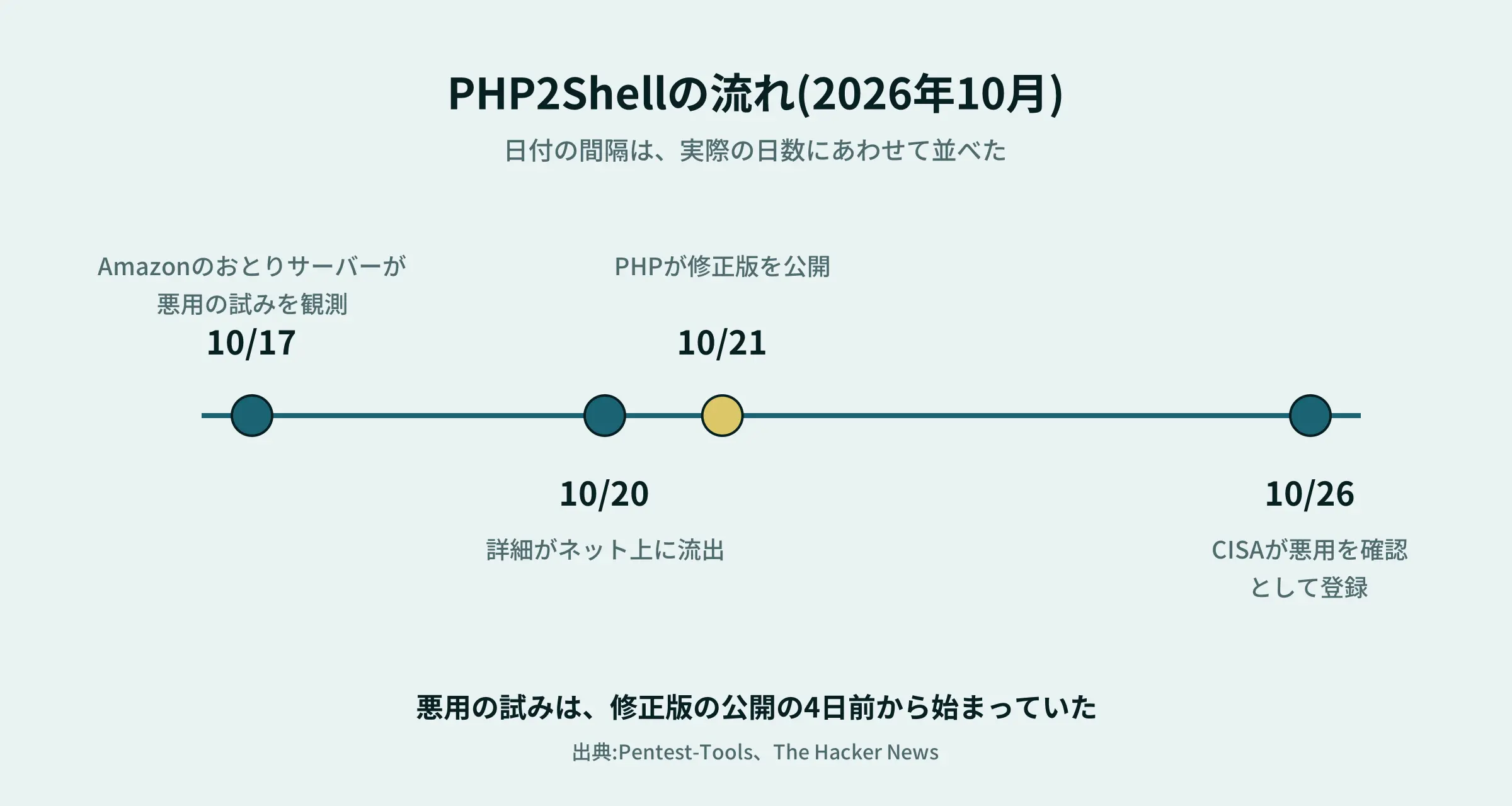
Date (2026) | Events |
October 17 | Amazon's honeypot (decoy server) was the first to observe attempts at abuse (four days before the release of the revised version). |
October 20 | Details leaked online two days earlier than the official release schedule |
October 21 | PHP releases a revised version (8.5.12, 8.4.27, 8.3.36, 8.2.35) |
October 26 | CISA in the United States registers the vulnerability as a confirmed exploit (The Hacker News) |
Censys estimates that over 32.51 million PHP services are still running in affected versions (same article). This is not a "number of abused" but a "number of potentially affected."
Also, there are no official fixes for PHP versions prior to 8.1, so migrating to the newer version is necessary. Updating WordPress or plugins does not fix PHP issues (Hostinger| What is PHP2Shell)。
Differences from mirror sites
Projects | PHP2Shell (Server Breach) | This time's mirror site |
Targeted Locations | Inside the server (weaknesses of PHP itself) | Outside the server (domain or external service settings) |
Is the vulnerability necessary? | Required (such as pre-fix PHP) |
No need. It works on a public site.
Traces left on the server
There is a high possibility that suspicious files or processes will remain
Very little remains. Access from Cloudflare appears in the logs.
When updating PHP,
preventable
unpreventable
In other words, updating PHP to the latest cannot prevent mirror sites. Conversely, countermeasures against mirror sites do not fix PHP vulnerabilities. Measures to protect the server and measures to look outside the site are needed separately.
In this consultation, we have not been able to confirm any relationship with PHP2Shell. However, if you want to review your site's security, it is recommended to also check the PHP version. For WordPress, you can view the PHP version under "Tools → Site Health → Information → Server." For shared rental servers, it is reassuring to check whether the server company has supported them.
Speculating on how mirror sites work
From here on, this is a speculation based on research results. It is not a definitive conclusion about the actual configuration. Mirror sites are probably created in the following manner.
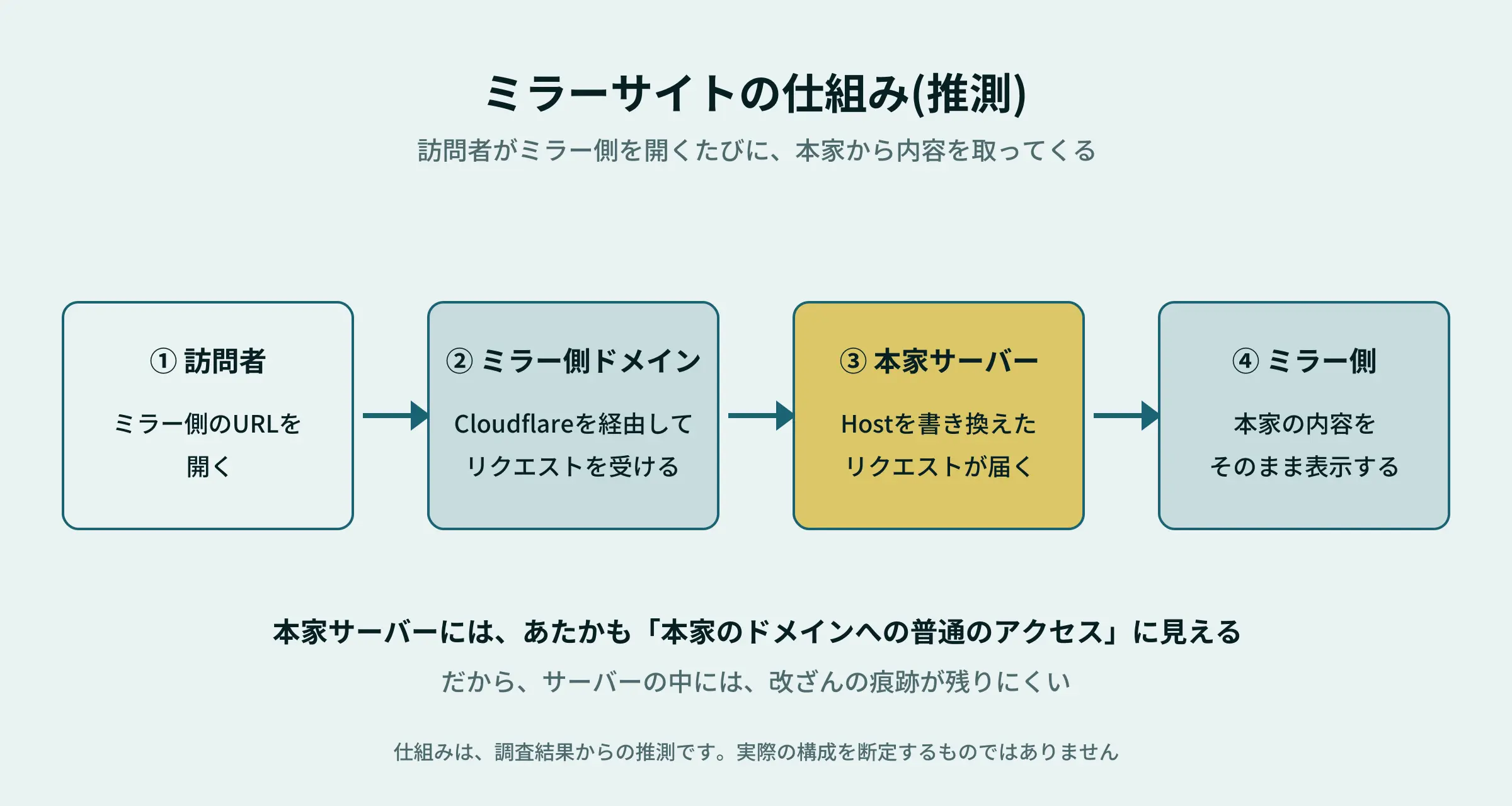
- Operators obtain a different domain (example.xyz) and list them on Cloudflare's free plan.
- Set the "acquisition destination" of the mirror domain on Cloudflare to the main server.
- Rewrite the "Host header" of requests sent to the main server with the original domain (example.net)
- When visitors open the mirror side, Cloudflare retrieves the content from the main server and returns it as is
- Furthermore, the original domain name on the page may be replaced with the mirror's domain name, and all links may be completed within the mirror. If this replacement extends to the domain part (info@example.net → info@example.xyz) of the email address posted on the page, emails sent by customers may end up reaching the mirror's operator's domain
The fifth replacement is thought to involve swapping the domain name strings together. Therefore, not only links within the site but also email addresses and mailto links written on the page may be replaced if they contain the same string (our guess is that we have not checked the scope of the replacement).
The Host header is information that tells the server which domain is accessing it. Cloudflare officially provides a feature to override this value (Cloudflare| Origin Rules feature).
Without rewriting, the main server will reject access to an unknown domain. Because of the rewrite, the main server will appear as "normal access to the original domain."
Cloudflare is a legitimate service for CDNs and security measures. The issue this time is not so much that the service itself is bad, but that its mechanism can be used to copy other people's sites.
Why are updates from the original series reflected immediately?
A typical copy site saves the HTML once and places it on your own server. Therefore, updating the original site does not reflect the copy itself.
On the other hand, if the system is like this and the content is retrieved from the original site every time you access, the situation changes. The original update's updates are reflected as is. There is no need to create copies or update the content. For fake site operators, once set up, they can leave the rest of the process and continue displaying the latest content as the original, making it a convenient method.
This is likely why you think "the server has been logged in" and find nothing when you check.
What are the disadvantages of having a mirror site?
Since the appearance is exactly the same as the original, the disadvantages are broad and deep. Here, I organized it under "For whom are the disadvantages?" What was confirmed in this case and what could be explained by the mechanism are clearly distinguished.
Disadvantages for customers (visitors)
The biggest issue is that visitors can't tell the difference between real and fake. Not many people check the URL. If you open it from search results or social media links, they believe it as is.
Moreover, the mirror relays communications between the visitor and the main home. Structurally, they can view and rewrite the contents of the communications midway. Therefore, the following situations are considered possible.
- Name, email address, phone number, etc., entered in the inquiry form may be passed on to a third party
- If there is a site with member login, your ID and password will be stolen.
- Phone numbers, bank transfer addresses, links, and other details on the page can be rewritten.
- The domain part of the email address on the page is replaced with the mirror's domain. For example, if the display labeled "info@example.net" or the email link (mailto) changes to "info@example.xyz," emails sent by customers will be delivered to domains managed by the mirror operator. Since the administrator owns that domain, they can also set up receiving emails.
- Reservation and purchase processes are redirected to a different location
These are not cases where damage was confirmed in this case. However, since it is already formed by the mechanism, it cannot be said that it "did not happen."
Disadvantages for businesses
Visitors are not the only ones affected by mirror sites. The original operators are also affected in various ways, including trust, sales, information management, and daily operations. Here, we will organize what can happen one by one.
Impact on Credit
When something happens on a fake site, for customers, it becomes an event under the original name. Since mirrors look and contain the same as the original, customers do not perceive it as "something that happened on another site." The impression that "you were harmed by that company's site" is difficult to erase later.
Even if the original company is not at fault, they may be overwhelmed with explanations or need to respond with apologies. The troublesome aspect of mirror sites is that long-built trust can be damaged in places you cannot manage yourself.
Missed Inquiry Opportunities
Customer inquiries (forms or emails) may end up in places where they do not reach the original site. If the email address, phone number, or form submission address on the page has been changed, you may think you contacted the original site but actually received it elsewhere.
The problem is that nothing is visible from the original company's perspective. Even if inquiries seem to decrease, it's hard to realize the cause is mirroring, and even if actual sales or reservations are missed, there's no way to verify later (this is a hypothesis due to the mechanism, so in this case, we did not check).
Potential for phishing scams
Sites that look just like the real thing are easily used for phishing. If the Mirror operator only replaces the login and input forms, the appearance will be the same as the original. If that page spreads on social media, people may be deceived by using the original name.
Those who have been victims will likely contact the company or file complaints. There is a risk that voices claiming "I suffered a victim on that company's website" will reach the official website (this is speculated to be possible due to the system, and in this case, we have not confirmed it). For the domestic situation, please refer to the numbers in Supplement 1.
Risk of user information leakage from backups
If you use a WordPress backup plugin and the backup files remain in the server's public folder, anyone can retrieve them once the file's location and name are identified. Mirrors do not have special permissions, so the conditions are the same as direct retrieval. In other words, rather than just having a mirror, the problem lies not only in the mirror itself but in the state that is public.
If the backup includes a database, user information such as usernames and email addresses may be analyzed by third parties. Passwords are usually stored in a form that is hard to restore (hash), but simple passwords can be identified (this is a general explanation and not confirmed in this case). Details are covered in Supplements 2 and 3.
Irregular access numbers
If the page code is directly copied, the access analysis tags may also move as is. In such cases, mirror access may mix with your company's numbers, distorting your judgment.
For example, even if traffic suddenly increases, it may not actually be a genuine customer. Since it affects ad effectiveness and decisions about page improvement, caution is needed if you decide based on numbers (our guess; in this case, we did not verify this).
Load on the server
Access to the mirror changes each time to access the main server. As mirror access increases, the load on the original server also increases.
In environments like shared rental servers where you don't have enough resources, you might experience slower displays or receive feedback from the server company. Accessing your site without your own site only increasing the server load is a hard-to-notice burden (I guess, but I haven't checked this in this case).
The burden of investigation and response
Checking logs, reporting, and explaining to customers takes time beyond regular work. This time, as well, it actually took time to investigate the server, check mirrors, and prepare reports.
Moreover, even if you stop one domain, it may reappear in another domain. The fact that it doesn't end all at once and requires continuous monitoring is also a burden for operators.
Disadvantages of searching
When pages with the same content exist across multiple domains, search engines need to choose which one to display. Google cites rel="canonical" as a solution for duplicate pages. However, this is a "strong signal" and not a directive to follow (Google Search Central | Integrating Duplicate URLs).
Furthermore, Google's spam policy classifies the act of reposting content from other sites without adding its own value as "scraping," classifying it as a type of spam. If you find spam, you can report it in the Search Quality report (Google Search Central | Spam Policy).
However, this document does not include procedures for the copied party to delete copies from other sites. In this case, it has not been confirmed how much this affects the original site's search rankings.
Legal Disadvantages
If it is found that personal information has been leaked via mirror, the business operator may need to explain to customers and respond to relevant organizations. Since this can vary greatly depending on the situation, consulting a specialist is recommended.
Summary of Disadvantages
Disadvantages | To whom | Possible Scenarios | Status of this review |
Unable to distinguish between genuine and fake | Visitors | Open the mirror side from search or social media | Match of displayed content confirmed |
Leakage of input information | Visitors | Forms, logins, and more | Possible due to the mechanism (damage not confirmed) |
Rewriting phone numbers, email addresses, and links | Visitors and Operators | Replacing information within the page | Verified |
Exploitation for phishing scams | Visitors and Operators | Replacing login and input sections, spreading on social media | Check links and spread status to ensure no abuse |
Information leakage from backups | Operators and Visitors | Backups remain in public folders | Originally, backups were protected against breaches. |
Decline in Credit | Operators | When trouble occurs on a fake site | Possible by mechanism |
Confusion in access numbers | Operators | When the analysis tag remains active | Speculation (unconfirmed) |
Load on the server | Operators | When access on the mirror side increases | Speculation (unconfirmed) |
Disadvantages in Search | Operators | The same content exists across multiple domains | The magnitude of the impact has not been confirmed |
Burden of investigation and response | Operators and Production Companies | Post-discovery confirmation, reporting, and preparedness for recurrence | This time, it actually occurred. |
Response when a mirror site is found
Once you find a mirror of your site, it's best to proceed in the next order before rushing to act. The chapters beyond here are the most important parts of this article.
1. Start by recording
Record the mirror's URL and the date and time you found it. Also take a screenshot of the entire page. This will serve as material for later reports and as evidence after the mirror has been deleted.
If possible, save the page's HTML as well. Keeping the retrieved date and time along with the file hash value makes it easier to indicate later that it has not been tampered with. When saving, minimize opening the mirror side page and do not enter anything in the form.
curl -s https://example.xyz/ -o mirror-top.html
date -u +"%Y-%m-%dT%H:%M:%SZ" > mirror-top.time.txt
sha256sum mirror-top.html > mirror-top.sha256
2. Compare the original and displayed content
Check how much remains the same, how the link destination is, and whether the contact form destination has changed. Whether the mirror link is designed to return to the original or to be completed within the mirror can also be a clue. Open the page source and check whether the original domain name has been replaced by the mirror domain. In particular, it is important to check whether the email address (both the display and mailto links), phone number, and contact link on the page have changed to the mirror's domain. If the domain part of the email address has been replaced, your emails may end up reaching the mirror's operator's domain.
3. Verify if you are using Cloudflare
By examining the mirror-side domain, you can determine whether Cloudflare is being used. For example, you can verify this with a command like the following (let's say the mirror-side domain is example.xyz).
# ネームサーバーを調べる(Cloudflareなら「…ns.cloudflare.com」と出るのが一般的)
nslookup -type=NS example.xyz

# 応答ヘッダーを見る(Cloudflareなら「server: cloudflare」や「cf-ray」が付くのが一般的)
curl -sI https://example.xyz/
If Cloudflare's name appears in the name server or response header, it is highly likely that the operator is via Cloudflare. However, this only shows that Cloudflare is being used; the operator is unknown.
4. Compare your server's logs
The most reliable method is to open the mirror side yourself and look for the access logs from that time. If access to the same path is recorded in the main access log at the time the mirror URL is opened, it is proof that the mirror is taking it from the original.
The source of that access is not the visitor, but the Cloudflare IP address. Cloudflare publishes the range of its own IP addresses (Cloudflare| Cloudflare IPs)。 If the original provider does not use Cloudflare but there is a large volume of access from addresses within that range, it can be a clue to suspect the presence of a mirror. Frequently accessed senders can be listed, for example, using the following command (an example of Apache's combined log format).
awk '{print $1}' access.log | sort | uniq -c | sort -rn | head -20To ensure you can investigate in time, check in advance whether access logs have been automatically deleted. Logs may be deleted after a certain period depending on server settings (rotation). Once found, it's best to copy logs from that period to another location for peace of mind.
5. Report
The following points of reporting are considered.
- Cloudflare's Fraud Report Form (abuse.cloudflare.com). Cloudflare states that it cannot delete content it does not operate. However, it forwards the report to the hosting provider, and if the content is complete, the host's contact information will be disclosed (Cloudflare| Abuse Policy)。
- Mirror-side domain registrar (registrar)
- Reporting to search engines (spam reports and copyright infringement allegations)
When writing your report, organize the following content to make it easier for the other party to make a decision.
- Mirror side URL and original URL
- Date and time found along with a screenshot of the entire page
- Access logs of the main server (excerpt from parts identified as via mirror)
- Explanation of being the operator of the original house (holding rights)
- Problems (such as being unable to distinguish the real thing from the real thing, or risk of missing information, etc.)
Reporting does not mean it stops immediately. However, stacking records and reporting will prove effective later. Alongside reporting, proceed with technical measures in the next chapter.
Technical measures that defenders can take
Honestly, it's difficult to completely prevent it. However, if you break it down into 'noticing,' 'stopping at the entrance,' 'guiding mirror visitors to the real thing,' 'preparing on the page side,' and 'continuously watching,' you can see what you can do.
Note that the countermeasures in this chapter include our own assessments. Since these were not tested in actual environments, please verify them in a test environment or backup before changing the settings.
First, as a premise, the method of rejecting unknown domains by looking at the Host header on the server side does not work with this mirror. As mentioned earlier, the Host header will be rewritten to the original one.
Overall Countermeasures
Stages | Purpose | Main Methods |
notice | Find the mirror quickly | GA4 hostname, access logs (Referer), searches and alerts, marker strings, certificate records |
stop at the entrance | Prevent the mirror from being removed from the original | Cloudflare IP range denial, Authenticated Origin Pulls, Cloudflare Tunnel |
guide | Return mirror visitors to the real site | Redirecting access from Cloudflare's IP range to the original URL |
Prepare on the page side | Reducing Damage and Impact on Search | canonical, hostname notification script, form origin verification |
keep watch | Noticing recurrence | Regular checks, automatic IP range updates, PHP and plugin updates |
1. Measures to Notice
- View the "hostname" in access analysis: Google Analytics (GA4) has a dimension called "hostname." When added to the page report, it shows which domains are being measured and can be used to detect staging environments and spam domains (MeasureU| GA4 hostname report). If the page code is copied as-is and the parsing tags are active, the mirror hostname may appear here.
- View server access logs: Requests via Cloudflare are marked with headers such as "CF-Ray" or "CF-Connecting-IP" (Cloudflare| HTTP request headers)。 If you set this to log your way, it becomes easier to distinguish access via mirrors.
- Find the mirror's domain in the Referer log: The browser of the visitor who opens the mirror page should send the mirror's URL as the Referer when loading images or CSS. This value may still reach the original site even if it passes through Cloudflare. Let's count domains other than your own in the Referer field (example commands are provided below). If unknown domains appear mixed among familiar ones like Google or social media, it's worth checking them. However, if the header has been rewritten on the mirror side, it may not be found.
- Check regularly with search: Search your site name or distinctive text to see if you don't see any unfamiliar domains. Be sure to register it in Search Console as well. If you register your landmark string in Google Alerts, you can receive notifications when new ones are found.
- Look for similar domain registrations: SSL certificates have publicly available records (Certificate Transparency), and services like crt.sh can check if a new certificate for a domain containing your company name has been issued. However, since the mirror side cannot detect domains unrelated to your company name, this is also an auxiliary method.
- Include a string of text as a marker: Insert a short string in an inconspicuous spot on the page that rarely appears on other sites. Searching for that string makes it easier to find when the entire page is displayed.
Here is an example of a command to count domains in the Referer field (an example of Apache combined log format).
awk -F'"' '{print $4}' access.log | grep -v '^-$' | sed -E 's#^(https?://[^/]+).*#\1#' | sort | uniq -c | sort -rn | head -202. Measures to stop at the entrance
Which measures you can use depends on whether your main site uses Cloudflare.
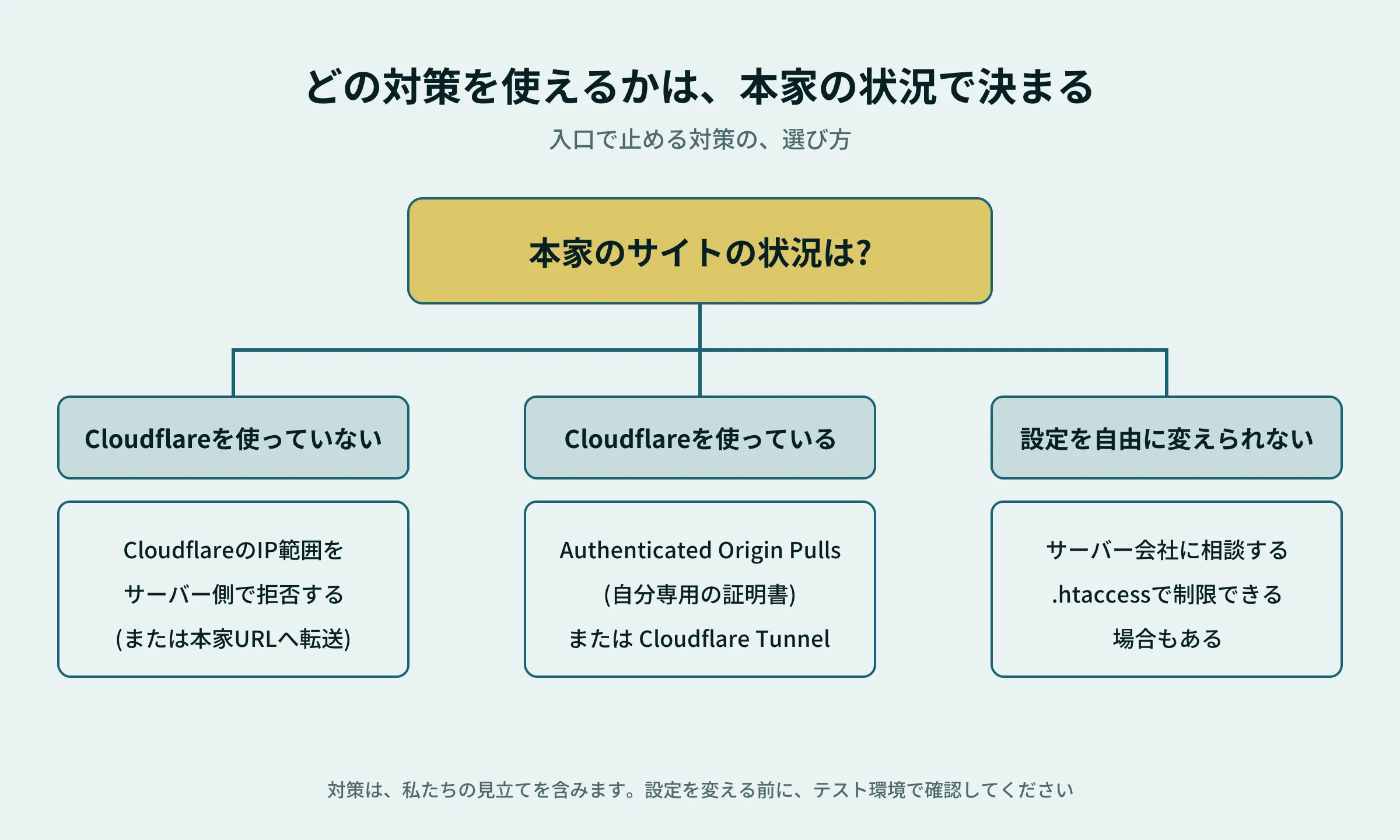
Status of the Original Works | Possible countermeasures | Points to Note |
Not using Cloudflare (such as typical rental servers) | Server-side denial of access from Cloudflare's IP ranges | There is a risk that legitimate services accessed via Cloudflare may also be halted. |
They also use Cloudflare in-house | Set up "Authenticated Origin Pulls" with your own certificate. Or do not publish the server in Cloudflare Tunnel. | Common certificates (global settings) cannot distinguish access from other accounts. |
Cannot freely change server settings | Consult with your server company about IP restrictions. Sometimes restrictions can be restricted using htaccess. | Some writing methods may not work depending on the type of server. |
If the original company does not use Cloudflare
Access via mirrors is received from Cloudflare's IP address. Therefore, you can consider how to deny access from that range. If you can use .htaccess on an Apache server, for example, it would be written like this (an example of Apache 2.4 usage). Depending on the server, it may not be available.
<RequireAll>
  Require all granted
  # Cloudflareが公開しているIPの範囲を、1行ずつ追加する(下は書き方を示すためのダミー)
  Require not ip 203.0.113.0/24
</RequireAll>
For nginx, specify the same range with deny in the configuration file (here is another example of how to write it).
# server または location のブロックの中に書く
deny 203.0.113.0/24;   # ダミー。Cloudflareの公式の一覧に差し替える
allow all;
IP ranges may change. Do not paste samples as-is; always check Cloudflare's official list and update it regularly.
After setting the settings, check the following three points.
- Opening the mirror side URL and finding it no longer displayed (resulting in an error)
- The original website is displayed as usual
- External integrations required for the site, such as inquiry forms and payment notifications, are activated.
Note that it is not recommended to judge by the presence or absence of headers such as "CF-Connecting-IP." This is because Cloudflare's mirror settings allow a feature to prevent visitor IP headers from being sent back to the original (Remove visitor IP headers), which may cause headers to be removed (Cloudflare| HTTP request headers)。 It is considered more reliable to determine the source of the connection by the IP address.
One thing to be careful about is that legitimate services accessed via Cloudflare may also be stopped. For example, notifications for payment services running on Cloudflare or external monitoring services. Before imposing restrictions, identify the external integrations your site requires.
If you are also using Cloudflare
In this case, simply saying "access from Cloudflare" is not enough to distinguish between your own and someone else's. This is where "Authenticated Origin Pulls" come into play.
According to Cloudflare documentation, global settings using common certificates only guarantee that the certificate is "from Cloudflare's network." On the other hand, zone-based settings using self-uploaded certificates are stricter because the certificates are exclusive to your account (Cloudflare| Authenticated Origin Pulls)。 In other words, by using your own certificate, you can access from someone else's domain on the server side.
The other is Cloudflare Tunnel. Since you place an agent on the server and connect only through outbound connections, you no longer need public IP addresses or ports receiving external connections (Cloudflare | Tunnel)。 Since the server's IP does not appear, it is difficult for the server to be designated as a destination by other people's domains. However, an environment where agents can be installed on the server is necessary.
If you cannot freely change server settings
On shared rental servers, the degree of flexibility in configuration varies by server. First, check whether the server you have contracted with htaccess supports IP restrictions. If that's difficult, consult the server company if you want to block access from a specific IP address range. If you can't do this, you can use PHP or similar tools to check the source of access and only refuse access when applicable, but since this is a specialized process, consulting the production company or someone knowledgeable is recommended.
3. Without stopping, guide the mirror visitors to the real thing
This is also our assumption, and we haven't actually tried it. Instead of stopping at the entrance, one option is to redirect access from Cloudflare's IP range to the correct URL of the original site. Since mirror visitors are directly directed to the real site, it may reduce the number of people staying on fake sites.
RewriteEngine On
# Cloudflareが公開しているIPの範囲に当てはまるときだけ、本家のURLへ転送する(IPはダミー)
RewriteCond %{REMOTE_ADDR} ^203\.0\.113\.
RewriteRule ^(.*)$ https://example.net/$1 [R=302,L]
However, please note the following points.
- If the destination domain name is replaced on the mirror side, the effect becomes ineffective.
- Since the mirror redirects the page each time it retrieves, it communicates to the mirror operator that countermeasures have been implemented
- Legitimate services via Cloudflare may also be transferred
- If you set it incorrectly, the main site itself may not be displayed. Please be sure to test it.
4. Measures to be prepared on the page side
- Set canonical to absolute path: Google recommends including rel="canonical" on the legitimate page itself, and writing URLs with absolute paths rather than relative paths (Google Search Central | Integrating Duplicate URLs). However, if the domain name is replaced on the mirror side, the effect weakens, so this is only supplementary.
- Verify the displayed domain on the page side: When the domain is not the main one, you can insert a small script that notifies your server of the hostname. This can be effective as a mechanism to help you notice. However, if the mirror side rewrites the page content, it may be avoided. For example, if you write the original domain name directly in the script, it will be replaced with the mirror's domain name, allowing verification to slip through. If you write the domain name in a way that is assembled into several strings, it becomes less likely to be replaced. Don't rely solely on this; use it as an auxiliary mechanism.
- Check the "Origin" in form submissions: When sending forms via POST, browsers generally add the "Origin" header indicating the source. Messages sent from the mirror page should have Origin as the mirror's domain. If you allow Origin to reject or log POST that is not your domain, you can reduce or notice submissions via the mirror. Unlike the Host header, Cloudflare's default settings do not allow Origin to be rewritten (if you use Workers or similar on the mirror side, that's the case). Some requests do not include Origin, so please allow empty requests and verify in a test environment to avoid disrupting form functionality. Since this is a specialized task, it is recommended to consult the production company.
- Keep email addresses separate from the site's domain: If mirror replacement targets the site's domain name string, it is likely that email addresses from other domains will be difficult to replace (for example, using a domain different from the site's domain or a free email address). Alternatively, you can avoid directly listing email addresses and consolidate them into a contact form. However, since the form submission destination may be changed, please consider these measures together with the measures mentioned earlier. In our assessment, we have not confirmed the actual scope of replacement.
- Set the input form destination to an absolute URL: If the form is sent to a relative path, it will be completed within the mirror. If you write the original URL in an absolute path, even if sent from the mirror side, it will reach the original URL. However, this also becomes meaningless if rewritten on the mirror side, so it is only a supplement.
5. Keep watch
Even if you take measures once, if the person running the mirror changes their approach, they may appear in different forms. It's recommended not to take a one-time countermeasure but to make it a habit.
Frequency | Things to Do |
Weekly | Search by site name and a string of landmarks. View the GA4 hostname |
Every month | Check the access logs for any unfamiliar senders. Review the list of Cloudflare IP ranges (if denied) |
Each time you update | Keep PHP, WordPress, and plugins up to date. Delete unused items |
When you find | Record and report, and review entry measures if necessary |
Especially if you reject Cloudflare's IP range, if the range changes, the old settings will be omitted. Cloudflare publishes the ranges and provides a list of text formats (ipv4 and ipv6). If you regularly retrieve these and rebuild the configuration file, you won't forget to update them. Here is an example of nginx (this is just a writing example; please check in a test environment before running).
#!/bin/sh
# Cloudflareの公開一覧から、nginxのdeny設定を作る例
OUT=/etc/nginx/conf.d/cloudflare-deny.conf
TMP=$(mktemp)
for v in ips-v4 ips-v6; do
  curl -s https://www.cloudflare.com/$v | while read ip; do
    [ -n "$ip" ] && echo "deny $ip;" >> "$TMP"
  done
done
# 取得に失敗して空のときは、既存の設定を残す
if [ -s "$TMP" ]; then
  mv "$TMP" "$OUT" && nginx -t && nginx -s reload
fi
A point to note: this method applies only when the main server does not use Cloudflare. Also, since the data is obtained from the main server, the source may change or the list format may change. Please check the execution results occasionally.
6. Still Remaining Limits
Stopping at the entrance does not completely resolve the issue. If the operator of the mirror switches to relaying from servers other than Cloudflare, such as servers rented by themselves, access will be made from another entrance. In that case, new IP addresses will appear in the access logs, and as soon as they are found, individual rejection is required. There is an aspect of cat-and-mouse play.
Fundamentally, the only option is to report to the mirror's domain or hosting provider and have them stop it. I think it's realistic to think of technical measures as a way to reduce damage and buy time.
What to start with
Period | Things to Do |
Today | Record (URL, date and time, screenshot). Open the mirror yourself and compare it with the logs. Inform the administrator not to log in from the mirror side. Check that the email addresses and phone numbers on the mirror page have not been replaced |
Within a few days, | Report (Cloudflare, registrar, search engine). Consider entry countermeasures and test them in a test environment. |
1 to 2 weeks | Implement countermeasures in production and verify operation. Include page-side preparations such as canonical and hostname notifications |
Afterwards | Continue weekly and monthly checks |
Data from Japan and the world in numbers
We will organize the numbers that have appeared so far by dividing them into "Japanese data" and "global data." Because the scope of research and counting methods differ, it is not possible to directly compare the numbers. We will also explain what was counted.
Data from Japan
In Japan, victims such as phishing and unauthorized transfers are continuously compiled by organizations like the National Police Agency and JPCERT/CC.
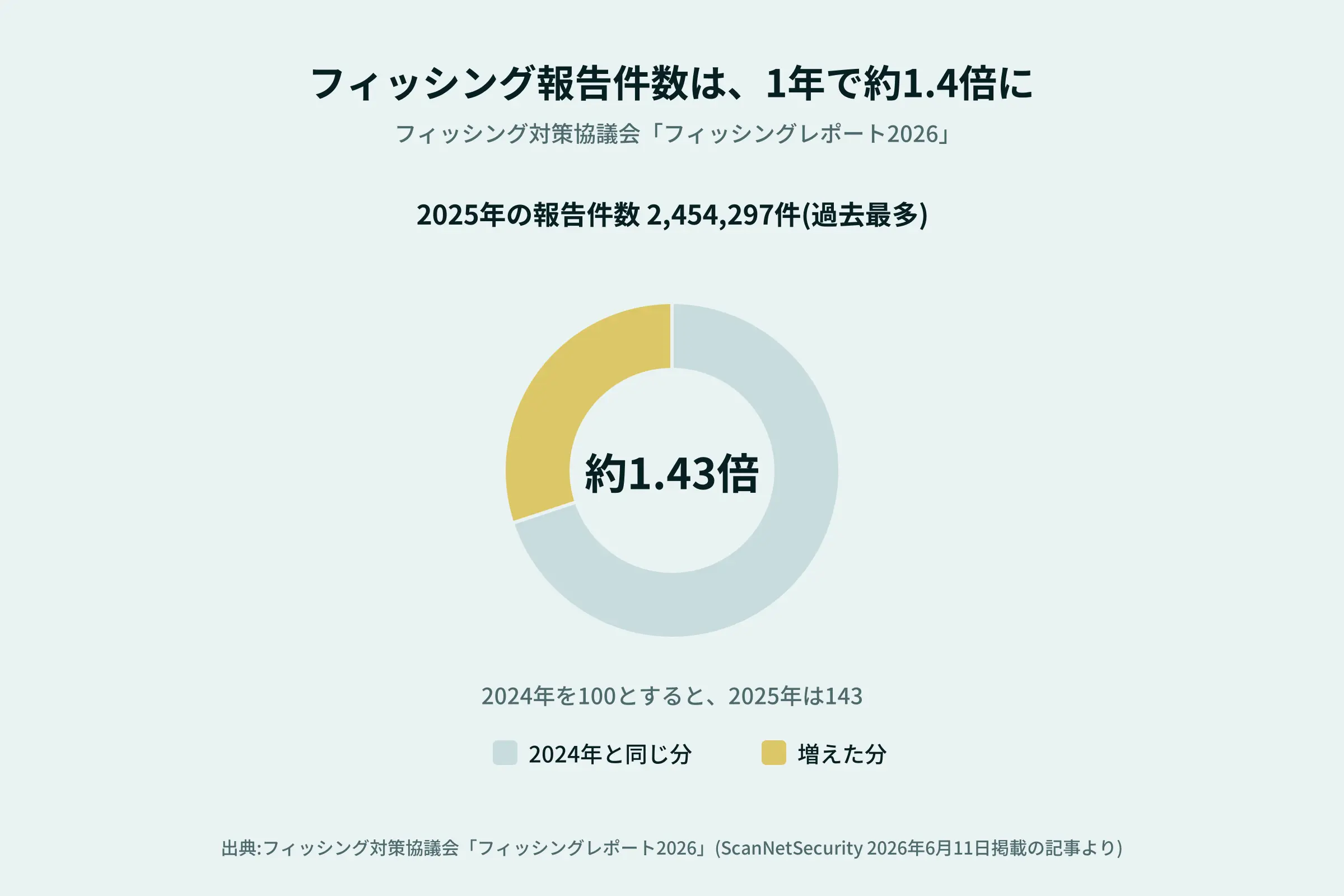
Projects | Numbers | Source |
Number of phishing reports (2025) | 2,454,297 cases (record high. About 1.43 times higher than in 2024) | Phishing Countermeasures Council, National Police Agency |
Unauthorized transfers from internet banking (2025) | 4,747 cases, total damage amounting to approximately 10.397 billion yen | National Police Agency |
Damage Amount from Credit Card Fraud (2025) | Approximately 51 billion yen (down about 9% year-on-year) | National Police Agency |
Ransomware Damage Reports (2025) | 226 items | National Police Agency |
Suspicious access searching for vulnerabilities (2025) | 9,605.7 per IP address per day (a 0.9% increase year-on-year) | National Police Agency |
Incident Reporting to JPCERT/CC (April–June 2026) | 14,056 cases (down 8% from the previous quarter) | JPCERT/CC |
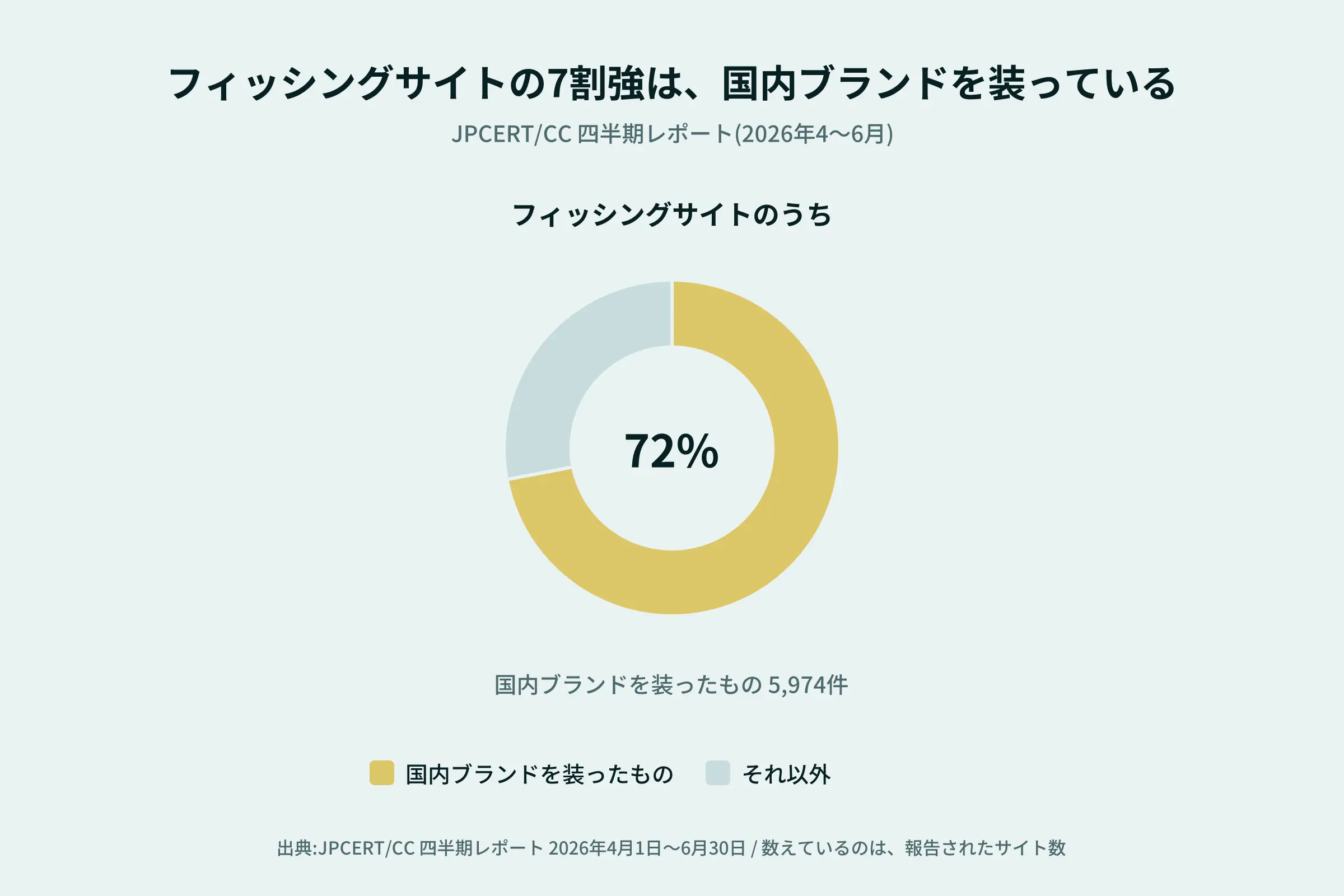
Phishing sites impersonating domestic brands (April–June 2026) | 5,974 cases (72% of all phishing sites) | JPCERT/CC |
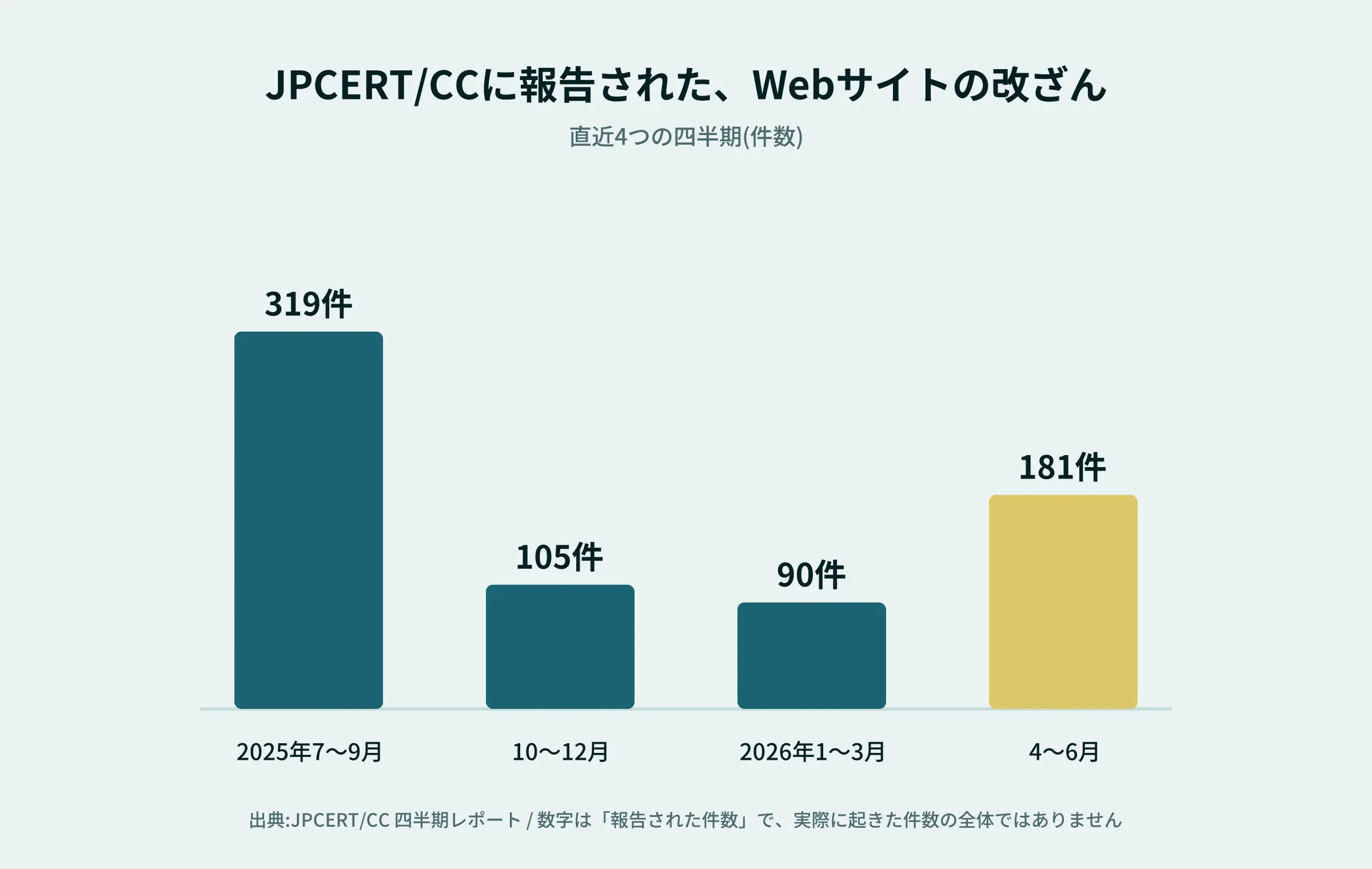
Website Tampering (April–June 2026) | 181 cases (about double the previous quarter's 90) | JPCERT/CC |
"Attacks Exploiting System Vulnerabilities" (2026) | Ranked 4th among the top 10 threats for organizations | IPA |
Among these, phishing reports reached a record high in 2025. Fake sites that look just like the real thing are no longer something special.
Website tampering reported to JPCERT/CC has fluctuated significantly quarter-on-quarter. The most recent four quarters saw 319 cases (July–September 2025), 105 (October–December 2025), 90 (January–March 2026), and 181 (April–June). All of these are "reported cases" and do not represent the total number of actual incidents.
References
- National Police Agency | Regarding the Threat Situation in Cyberspace in 2025
- JPCERT/CC | Quarterly Report (April–June 2026)
- JPCERT/CC | Quarterly Report (October–December 2025)
- IPA | Top 10 Information Security Threats 2026
Global Data
Global data mainly focuses on the number of WordPress vulnerabilities and the speed at which PHP vulnerabilities are exploited, focusing on the "number of weaknesses" and the "speed at which they are targeted."
Projects | Numbers | Source |
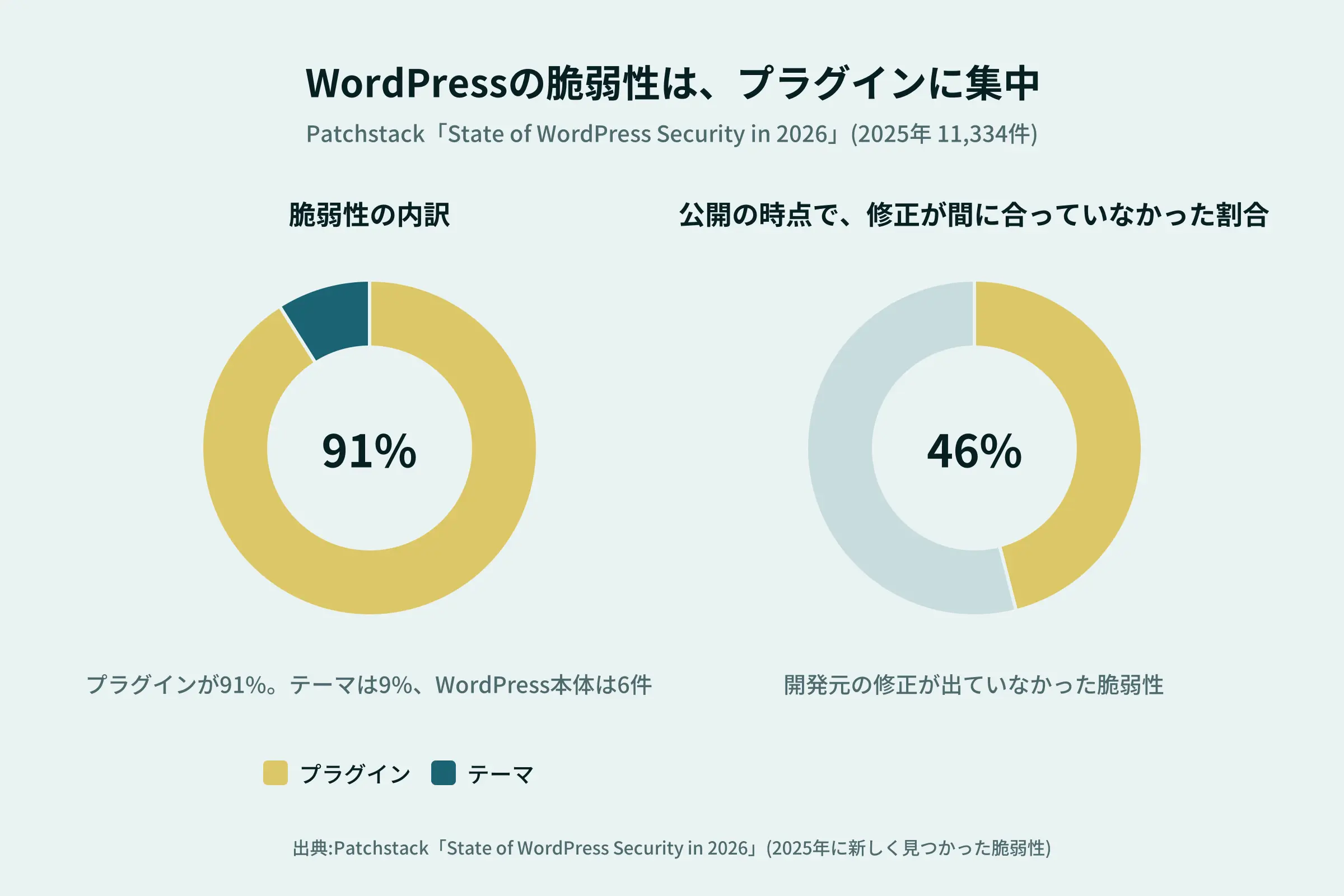
Newly Discovered Vulnerabilities Around WordPress (2025) | 11,334 cases (42% increase from the previous year) | Patchstack |
Breakdown | Plugins 91%, themes 9%, WordPress core 6 | Patchstack |
Items for which the developer had not yet made corrections at the time of publication | 46% | Patchstack |
Among the high-impact vulnerabilities, those exploited within 24 hours | About half | Patchstack |
Commonly targeted vulnerabilities, median time to first exploit (weighted median) | 5 hours | Patchstack |
PHP2Shell Severity (2026) | CVSS 9.2 (PHP Team) / 9.8 (NVD) | Pentest-Tools |
PHP services running with the affected version | Over 32.51 million (estimated) | Censys (from an article on The Hacker News) |
Confirmation of PHP2Shell Exploit (October 26, 2026) | CISA in the United States registers it as an exploited vulnerability | The Hacker News |
References
When you look at Japan and the world side by side,
From here, here is our estimate. Japan's data mainly reflects the number of "reported damages," while global data focuses on "number of weaknesses" and "speed before being targeted." In other words, Japan's numbers mainly reflect the consequences after they occur, while global figures mainly reflect the situation before they occur.
What both have in common is that the weaknesses of fake sites and servers that look just like the real thing are becoming increasingly familiar year by year. Things that occur in ways that are hard to report, like mirror sites, may not appear in these numbers. The actual number of cases may be higher than the numbers.
If it gets mirrored, will wp-config.php be seen?
I have a question that concerns me. When mirrored, can important files like WordPress configuration files (wp-config.php) be seen?
Usually invisible. However, there are conditions
The wp-config.php contains important settings such as database connection information and private keys (WPScan| WordPress Configuration File Backups)。 However, PHP files are "executed" inside the server, and only the resulting HTML is returned to visitors. The contents of the file itself are not sent to the browser.
The mirror only relays the content the server returns to the browser. Therefore, just because the mirror is mirrored does not mean you can see the contents of the wp-config.php.
The important point is that mirrors do not have special permissions. Mirrors can only be accessed by anyone on the internet using a browser. Conversely, if files like the following remain public, anyone can access them either directly or via the mirror.
- wp-config.php backup (.bak, .old, .zip, etc., saved with different extensions). Since it is not PHP, it may not run and the contents may be restored as-is.
- Configuration files such as .env
- Logging debugging and errors
- Folder where the list of files is displayed as is
- Backups and database dumps left in the public area
WPScan states that if a backup of the configuration file is publicly available, the entire contents of the database could be accessed from the database username and password. If found, it is recommended to change the private key and database password (see same article).
In this case, it has not been confirmed whether these files were publicly available. When you find a mirror, it is recommended to also check whether these files are publicly available.
The story changes when the server is compromised
As mentioned earlier, PHP2Shell is a different story when code is executed inside the server. wp-config.php is also read from within the server. This is why it is necessary to separate the discussion of "mirroring" and "server compromise."
Management and login pages are also relayed
Another thing to watch out for is the login page. Since mirrors relay all pages on the site, there is a possibility that /wp-admin and login pages can be opened from the mirror side.
If an administrator accidentally logs in from the mirror URL, the entered ID and password will pass through the mirror side. Since this can happen mechanically, administrators must always log in from the correct URL they saved themselves.
Supplement 3 | Risks of uploading to a server with free software and plugins
Vulnerabilities in software added later, such as WordPress plugins, are common entry points for server compromise. This is a different matter from mirroring, but it is unavoidable when protecting the "inside of the server."
Most of WordPress's weaknesses are plugins.
Global research shows that over 90% of vulnerabilities found around WordPress are plugins. Detailed figures are summarized in "Supplement 1."
What's especially important is that "about half of the files have not been fixed at the time of publication" and that "exploitation takes several hours." Waiting for updates shows that it cannot be considered safe.
WordPress itself is not bad
After reading this far, you might have thought WordPress was risky. But we don't see it that way. The honest view is that WordPress is not bad; rather, the difference arises depending on how you use it.
- There are few vulnerabilities in the main body:P According to atchstack's research, out of 11,334 cases found around WordPress in 2025, only 6 were the WordPress core itself (same survey)
- Often targeted because it's used: According to W3Techs, as of November 4, 2026, WordPress is used on 39.5% of all websites and 58.2% of sites with known CMSs (W3Techs| WordPress usage). Our view is that it's easy to target because it's heavily used, not because of low quality.
- PHP2Shell is not a WordPress issue:P Since it is a problem with the HP itself, even sites that do not use WordPress will be affected if they run with PHP
- Mirror sites are not limited to WordPress: this system relays the content of a publicly available site. The same can happen with any CMS or static HTML sites.
With practice, it becomes less scary
The scary thing about WordPress is "leaving what you put in unmanaged." Conversely, if you continue following these practices, you won't be overly scared.
Operations | Effects |
Limit the plugins and themes you add to only the ones you need | Fewer weak point entries |
Continue updating | Closed weaknesses |
Delete unused items | No Neglected Weaknesses Remain |
Place backups in a location where they are not publicly available | Settings files and similar items do not leak |
Protect the admin page (two-factor authentication, IP restrictions, etc.) | Makes it harder to get login hacked |
Keep PHP versions supported | Easier to avoid issues like PHP2Shell |
Occasionally check the situation through logs and searches | Notice abnormalities such as mirrors |
Regarding updates, considering that "about half of the files have no fixes at the time of publication" and "it takes several hours before abuse," it is important to apply fixes as soon as possible. WordPress also has features to automatically update plugins and themes. Whether to use them depends on the site's situation, but it has the advantage of being able to apply them faster than manual work. However, since updates can cause display distortion, it is advisable to back up and check after updates as well.
Frequent updates are proof of protection.
WordPress often receives update notifications, so some people feel that "fixing multiple times means there are many flaws." But we believe that having many updates is actually proof that the update is being protected.
- Weaknesses are something found in any software: the important thing is whether it can be fixed after being found. Updates are being made because the developers find vulnerabilities and continue to release fixes.
- The danger lies in those that no longer receive updates: Software that has stopped development will not be fixed even if new vulnerabilities are found. Plugins that have stopped updating are much more concerning.
- Because it is used worldwide, it is easy to find and fix: since there are many users and researchers, weaknesses are easier to find and fixes are faster and more efficient, according to our view
However, even if updates are available, they cannot be protected if they are not applied. According to Patchstack, 46% of updates were not made by developers in time at the time of release. It is recommended to receive update notifications as "protective alerts" rather than "annoyances."
These are not special matters but extensions of regular operations. When choosing a production company, it is also reassuring to check whether they can consult about updates and maintenance after release.
Risks of installing free software
While free software, plugins, and scripts are convenient, they carry the following risks.
- Vulnerabilities remain: Software that halts development will not be fixed even if new weaknesses are found
- Pay attention to where backups are stored: If the backup plugin is set to save backups on the server, it is essential to check that they are not stored in the public folder. The contents may contain a database (including user information). The basic rule is to keep the backup location in a folder that is not publicly available or in a different location.
- Left in: Unused plugins, file management scripts, and database management tools remain on the server, serving as entry points. Even if you disable them, if files remain, risks may remain.
- PHP version also affects :P like HP2Shell, PHP issues cannot be fixed even after updating plugins
- Unknown distributions: Paid themes or plugins distributed in unofficial places, such as "free versions," may contain fraudulent code (due to our concerns, we have not confirmed the numbers).
- Strong plugin privileges: Added plugins have strong permissions across the entire site, making damage more likely to spread from a single weakness
Mindset before and after insertion
- Only add what is necessary. When you stop using it, delete it instead of "disabled."
- Only use clear sources such as official directories or the developer's official website
- Check if the last update has been stalled for too long
- Update frequently. However, back up before updating.
- Do not leave copies of backups or configuration files in public folders
- Add security beyond passwords to the management panel, such as IP restrictions and two-factor authentication
- Keep your PHP version supported as well.
As a production company, I actually feel the difficulty of continuously managing what we have entered. The more you continue to operate a website after it goes public, the more points you want to pay attention to.
Frequently Asked Questions
Why can fake sites appear when the server hasn't been compromised?
In this system, the fake site retrieves content from the main site each time it accesses it and displays it under a different domain. Since there is no need to rewrite files on the server, it is believed that traces of tampering are less likely to remain on the server.
Does having a mirror site affect search rankings?
When pages with the same content exist across multiple domains, search engines must choose which one to display. Therefore, the original site may be at a disadvantage. However, the actual extent of the impact varies depending on the situation, and this case has not been confirmed either.
Does using Cloudflare make it easier for my site to be mirrored?
No. Cloudflare is used on the mirror side; it does not matter whether the original company uses Cloudflare or not. If the original server can be accessed from the internet, the same thing can happen.
If mirrored, will the contents of the wp-config.php be seen?
Normally, it is considered unvisible. PHP files run on the server, and only the resulting HTML is returned. However, if backups (such as .bak or .zip) or .env remain in public locations, anyone can retrieve them either via mirror or directly. If you have any ideas, I recommend checking them.
Is WordPress risky?
I don't consider WordPress itself to be dangerous. According to Patchstack's research, among the vulnerabilities found in 2025, six were in the WordPress core itself, most of which were plugins and themes. If you manage to narrow down what to add, keep updating, and remove unnecessary items, you won't be overly afraid.
Is it related to PHP2Shell?
In this consultation, no connection has been confirmed. PHP2Shell exploits vulnerabilities inside the server, while mirror sites use settings outside the server. Because the mechanisms differ, one countermeasure cannot prevent the other. It is recommended to check both.
How do you check if your site is mirrored?
The easiest way is to search for site names or distinctive text to check for unfamiliar domains. It can also be a clue if the server access logs show a large number of visits from unfamiliar IP addresses.
Simply protecting the server can cause invisible problems.
- Even if the main server is not compromised, the same content may appear on another domain.
- If the system fetched content from the original site every time you access it via Cloudflare or similar platforms, updates would be reflected as they are (speculation).
- The drawbacks range widely, including damage to visitors, business credibility, misuse for phishing, information leakage from backups, impact on searches, and the burden of investigation. However, what was confirmed this time was the consistency between the burden of investigation and response and the displayed content; other issues are possible due to the system.
- Japan's numbers focus on damage reports, while global numbers focus on the number of weaknesses and speed. Damages like Mirror's, which are hard to report, are less likely to appear in the numbers.
- Files in the public state can also be retrieved via mirror. WordPress itself is not bad; if you keep updating with only the necessary plugins and other additional software, you won't be overly frightened.
- Vulnerability measures like PHP2Shell for "inside the server" and "outside the server" checks like mirrors are needed separately.
- Once found, record it, compare, check logs, and report in that order. Technically, there are entrance countermeasures tailored to the situation.
Through this consultation, I was reminded to reconsider website security. Even if no issues are found on the server or WordPress, there is a possibility that the original site will appear on a third-party domain. I want to occasionally check not only the "inside the server" but also the "outside of the site."
 Contact Form


 Related Articles